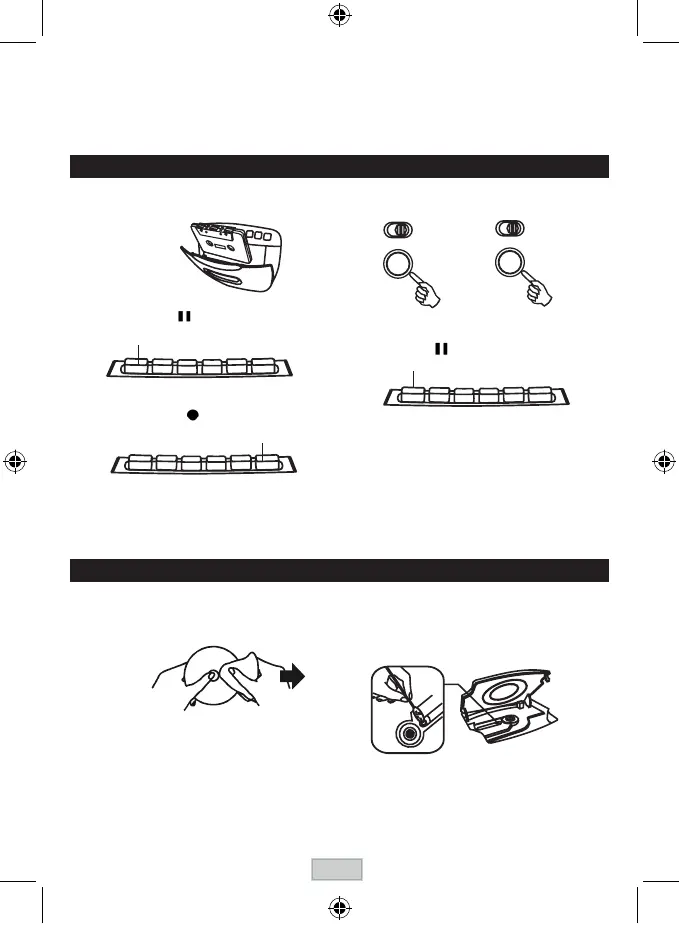
CLEANING CD
IftheCDskipsorwillnotplay,thediscmayneedcleaning
.Beforeplaying,wipethediscfromthecentreoutwitha
cleaningcloth.Afterplaying,storethediscinitscase.
MAINTENANCE
CLEANING THE CD LENS
If the CD lens
is dusty, clean it with a brush-blower. Blow
several times on the lens and remove the dust with the
brush.Fingerprintsmayberemovedwithacottonswab
moistened with alcohol.
CLEANING THE UNIT
Donotusevolatilechemicalsonthisunit.Cleanbylightly
wipingwithasoftcloth.
IMPORT
ANT NOTE
Ifanabnormaldisplayindicationoranoperatingproblem
o
c
c
u
rs, disconnect the AC power cord and remove the
batteries. Wait at least 5 seconds, then reconnect the AC
power cord or reinstall the batteries.
WARNING
Shou
ld
theCDdoorbeopen
ed
befo
re
theread
ing
oftheCD
iscompleted,ajammingnoisemayoccur.Thisisresolved
by closing the CD door.
TO STOP
PLAYBACK
Press the STOP / EJECT button.
TO INTERRUPT PLAYBACK
Press the PAUSE button.
Toresumeplay,pressthePAUSEbuttonagain.
RECORDING
USE ONLY NORMAL ( TYPE I ) T
APE FOR RECORDING.
1 . Insert the cassette tape.
2 . Press the PAUSE button.
PAUSE
Recording from the radio
Recording from a CD
PLAY THE CD TUNE INTO A STATION
3 . Press the RECORD button.
RECORD
5 . Press the PAUSE button.
PAUSE
TO STOP RECORDING
Press the STOP / EJECT button.
TO INTERRUPT RECORDING
Press the PAUSE button.
Toresumerecording,pressthePAUSEbuttonagain.
TO ERASE A RECORDED T
APE
1. Press the FUNCTION button to select TAPE.
2. Insertatapewiththesideyouwanttoerasefacingyou.
3. PresstheRECORDbuttontostarterasing.
T
O F
AST WIND
P
r
ess the REWIND or F.FWD button. Press the STOP/
EJECTbuttontostopwindingatthedesiredposition.
4 . Prepare to play the source to be recorded and
play it. Press the FUNCTION button to setect
CD or RADIO.
GB-8



 To Next Page