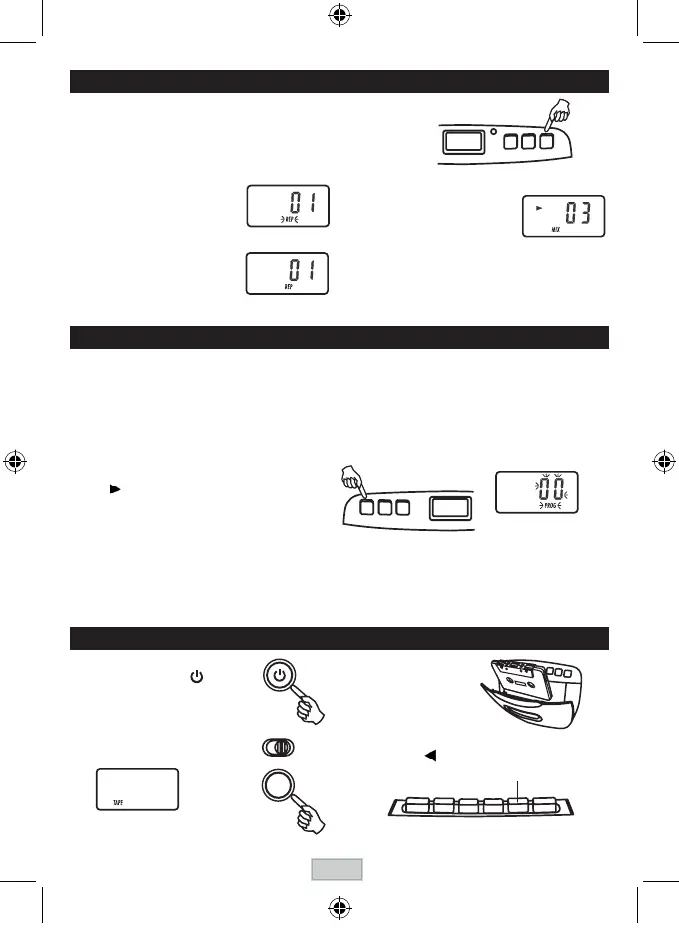
REPEAT , REPEAT
ALL AND MIX PLAYBACK
PressPLAYMODEbuttonduringstopmode.CDplayswithasingletrackrepeat,
all tracks repeat or randomly.
FOR NORMAL COMPACT DISC PLAYBACK
ModesequenceREPEAT>>REPEATALL>>MIX>>CLEAR.
DuringRepeat1mode,displayshows
DuringRepeat2mode,displayshows
DuringMixmode,displayshows
PROGRAMMED PLA
YBACK
PROGRAMMED PLAYBACK
Pro
grammed
pla
yback
ena
bles
tra
cks
onadis
c
tobepla
yed
inthedesiredorder.Upto20trackscanbeprogrammed.
1. Press the " PROGRAM " button.
2. Press the "
NEXT " and " BACK " buttons to select the
desired track number.
3. Pressthe"PROGRAM"buttonagaintomemorize
the track.
4. Rep
eat steps 2 and 3 until all desired tracks are
programmed.
5. Press the " PLAY/PAUSE " button to start.
" " , " PROG " & track number are shown on
the CD display.
6. Pressthe"STOP"buttononcetostopprogrammed
playback.
7. Press the " PLAY/PAUSE " button to resume
programmed
playback.
8. Open the CD door, turn off the CD player or press the
"
STOP"buttontwicetocleartheprogrammed
memory.
Note: Programmingcanonlybemadewhentheplayer
is in stop mode.
" PROGRAM "
LCD display
Note on CD-R/RW discs
-
Because
ofnon-standardizedformatdenition/productionofCD-R/RW,playbackqualityandperformancearenot
guaranteed.
-
Manufacturer
isnotresponsiblefortheplayabilityofCD-R/RWduetorecordingconditions,suchasPCperformance,
writing
software,mediaability,etc.
- Do not attach a seal or label to either side of the CD-R/RW disc. It may cause a malfunction.
- ItisrecommendedtorecordonlyaudiolesonCD-R/RWdiscsforeasyreading.
PROGRAM
PLAY MODE
TAPE PLAYBACK
3 . Insert the cassette.
1 . Turn on the unit by
pressing
thePOWERbutton.
POWER
2 . Press the FUNCTION button to
select TAPE.
LCD display
FUNCTION
4 . Press the PLAY button.
PLAY
LCD display
LCD display
GB-7



 To Next Page