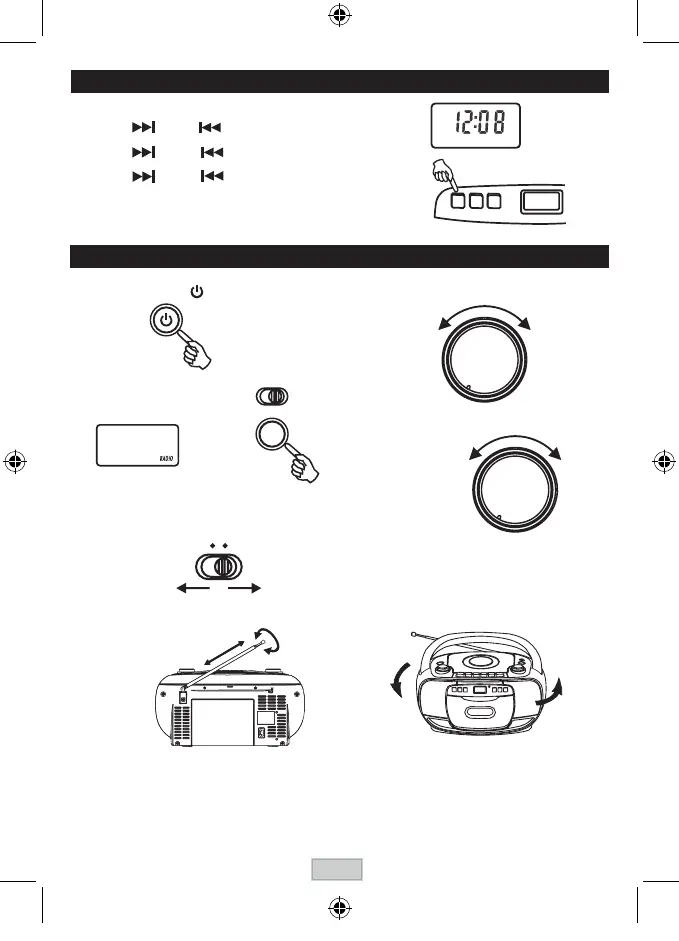
LISTENING TO THE RADIO
2 . Press the FUNCTION button to
select RADIO .
4 . Tune in to a station.
TUNING
5 . Adjust the sound.
3 . Select a band.
BAND
AM FM
The clock is displayed on LCD display at standby mode.on LCD display at standby mode.
1. Press and hold the PROGRAM / CLOCK-ADJ. button.
2. Press the NEXT or BACK to select 12 hours or 24 hours display.
3. PressthePROGRAM/CLOCK-ADJ.button,the hour digit ash.thehourdigitash.
4. PresstheNEXTorBACKtoadjusthourdigit.
5. PressthePROGRAM/CLOCK-ADJ.button,theminutedigitash.
6. PresstheNEXTorBACKtoadjustminutedigit.
7. PressthePROGRAM/CLOCK-ADJ.buttonagain,thecorrecttime
is shown on display.
CLOCK ADJUSTMENT
LCD display
1 . Turn on the unit by
pressing
thePOWERbutton.
FOR BETTER RECEPTION
FM
AM
AFTER LISTENING
TurnofftheunitbypressingthePOWERbutton.
LCD display
CLOCK-ADJ.
POWER
FUNCTION
VOLUME
MAX.MIN.
GB-5



 To Next Page