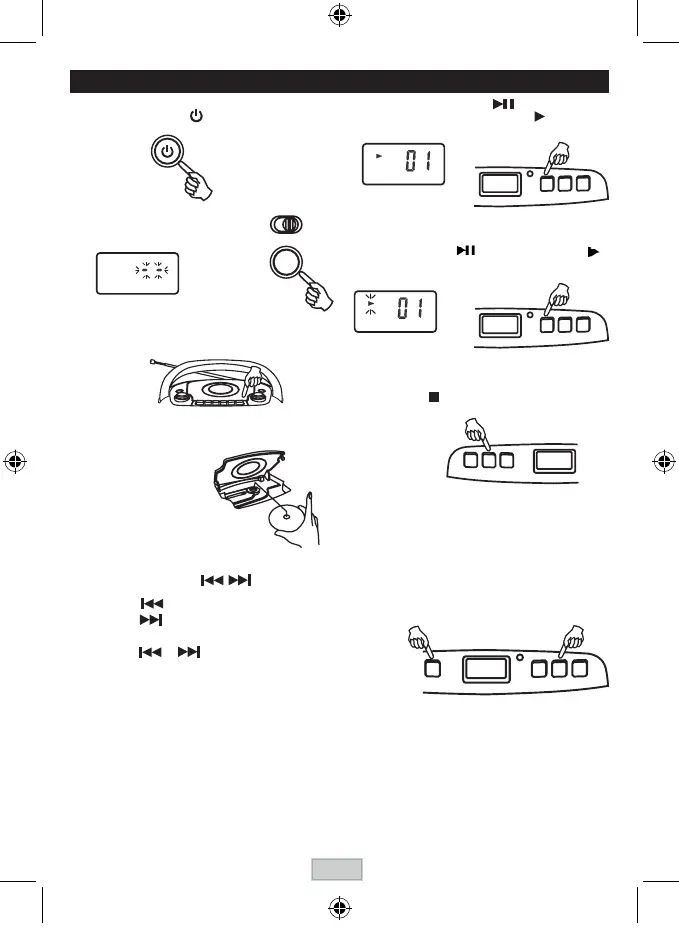
COMPACT DISC PLAYBACK
3. OpentheCDdoorbypushingOpen/CloseCD
button.
4. Insertadiscwiththelabelsidefacingup.
5 . Close the CD door.
The disc will rotate and
the total tracks of the disc
will show on the display.
TO SKIP T
O THE BEGINNING OF A TRACK
• Presseitheroneoftheskipbuttonsaccordingtothedesiredskipdirection.
• Play/back resumes from the selected track.
• Whenthebuttonispressedonceduringplay,theprevioustrackstartsagain.
• Whenthebuttonispressedonceduringplay,thenexttrackplays.
SEARCHING FOR A P
ASSAGE WITHIN A TRACK
• Keeptheorbuttonpressedduringplayback,
and
releasethebuttonassoonasyourecognisethedesired
passage.
ThennormalCDplaybackwillresumefromthispoint.
T
O ST
OP
PLAYBACK
Press the STOP button and the display shows the total
tracks of the disc.
TO INTERRUPT PLAYBACK
Press the Play/ Pause button and the symbol " "
willbeashed.Pressthebuttonagaintoresume
playback.
1 . Turn on the unit by
pressing
thePOWERbutton.
6. Press the PLAY/PAUSE button.
Track number "01" & the symbol " " will be
shown.
Unit will be automatically off after 30mins without furtheroperation(instopmode/CDdooropen).
POWER
2 . Press the FUNCTION button to
selectCD.Thesymbol"__"ashes
forsearchingCDdisc.
LCD display
FUNCTION
LCD display
LCD display
GB-6



 To Next Page