- EN 4 -
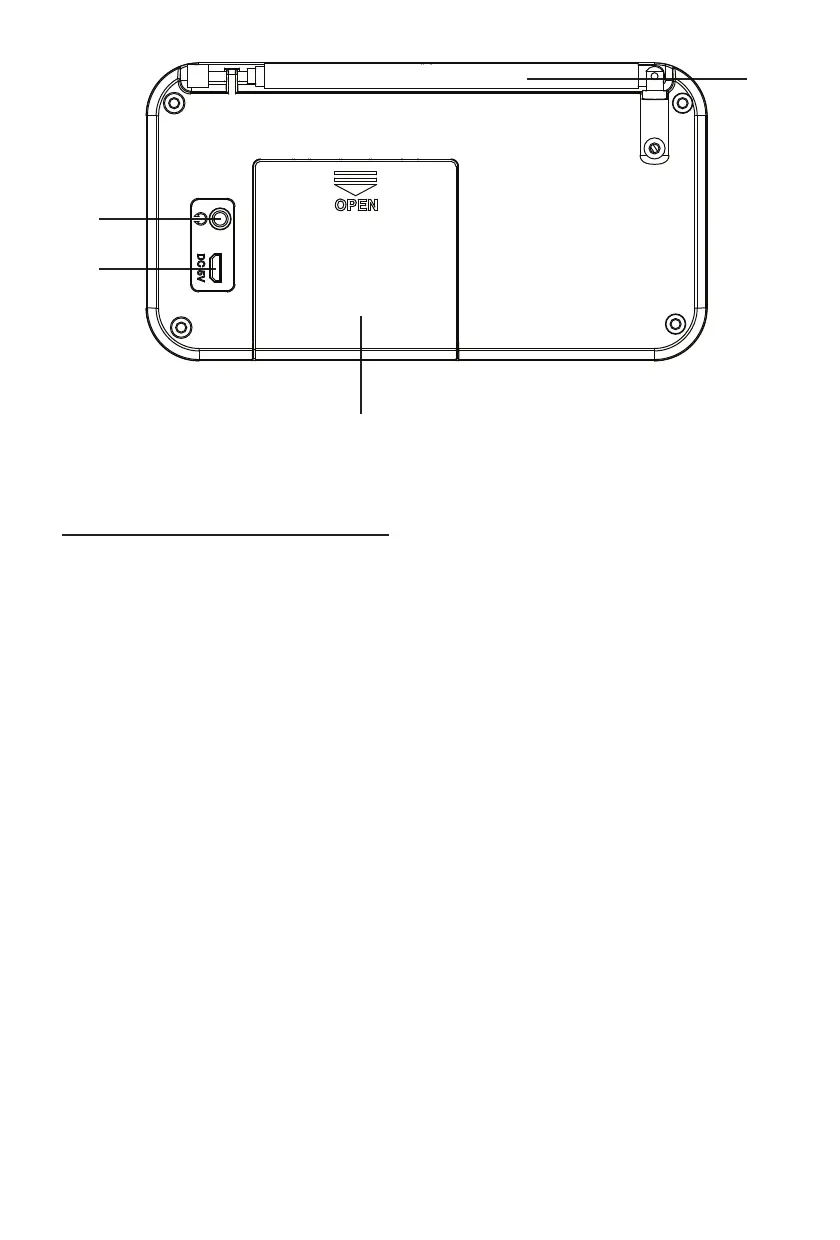
15) HEADPHONES JACK
16) DC IN JACK
17) ANTENNA
18) BATTERY DOOR
Start-up of the device/introduction
• Select a suitable location for the device, such as a dry, at, non-slip surface on which it is easy to
operate the machine.
• Ensure that the device is sufciently ventilated.
• Remove the protective lm from the display if it is still present.
Power Supply
• Connect the USB cable on the back of the unit.
Inserting the Batteries (not supplied)
1) Open the lid of the battery compartment.
2) Insert 4 x AAA batteries. Please ensure that the polarity is correct (see the oor of the battery
compartment)!
3) Then close the battery lid.
CAUTION:
• Batteries can leak and lose battery acid. When not using the system for a long period of time,
remove the batteries.
• Different battery types or new and used batteries must not be used together.
• Do not dispose of batteries with household waste. Return old batteries to the respective collection
facilities or your dealer.
WARNING:
The batteries shall not be exposed to excessive heat such as sunshine, re or the like. Danger of
explosion!
Turning device on/ off
• Press the “STANDBY / FUNCTION” button to turn the device on.
• To turn off the product, press and hold the “STANDBY / FUNCTION” button for approx. 3 seconds.



 To Next Page