- EN 3 -
What’s in the box
Check and identify the contents of your package:
• Main unit
• USB charging cable
• Instruction manual
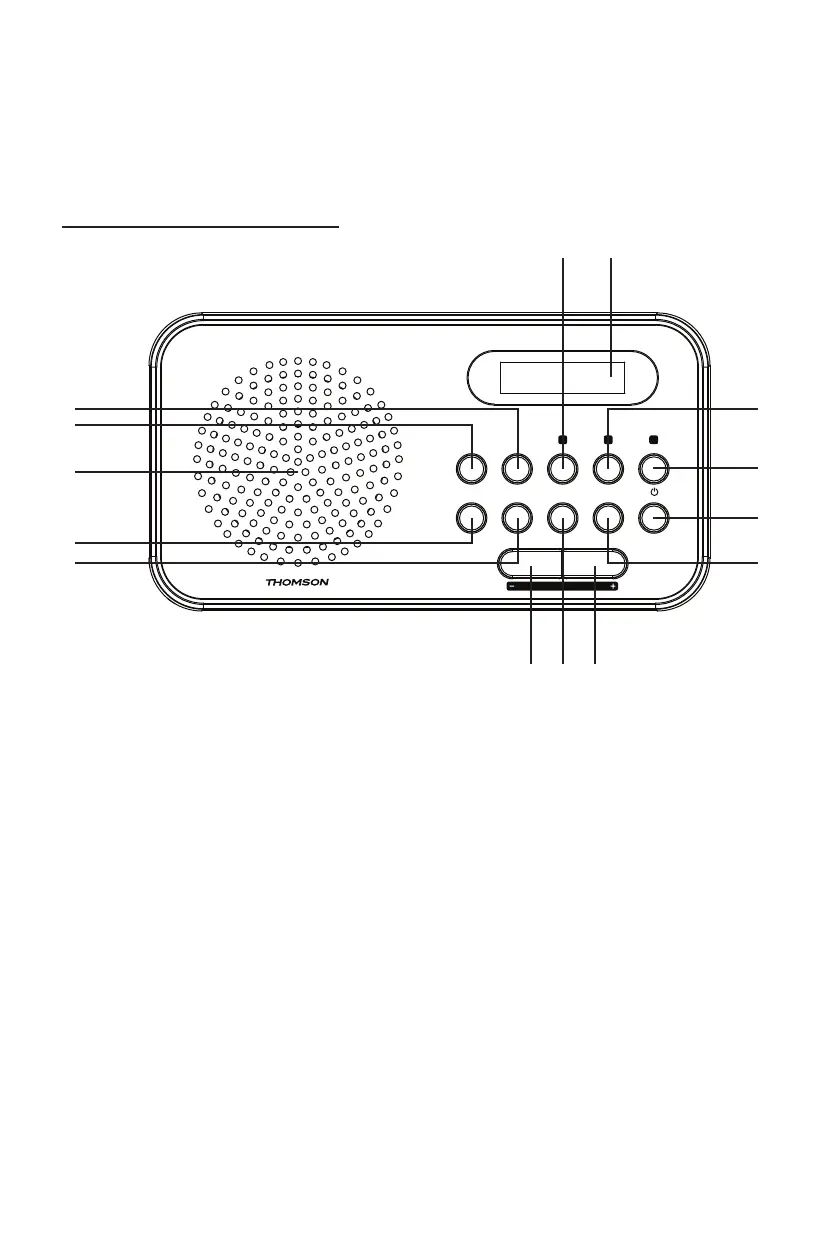
Overview of the Components
SCAN - SCAN + SLEEP
1
2 3
SNOOZEDIMMER
PRESET
1 ALARM 2
INFO/
MENU
CLOCK/
ENTER
SCAN/
MODE
/
FUNC.
VOLUME
8
9
1) SCAN+ button
2) SCAN- button
3) SPEAKER
4) PRESET button
5) INFO / MENU button
6) “HOT-KEY 1(Preset station 1) / SLEEP” button
7) DISPLAY
8) HOT-KEY 2 (Preset station 2) / DIMMER button
9) HOT-KEY 3 (Preset station 3) / SNOOZE button
10) STANDBY / FUNCTION button
11) SCAN / MODE button
12) VOLUME - / ALARM 1 button
13) ENTER / CLOCK button
14) VOLUME + / ALARM 2 button



 To Next Page