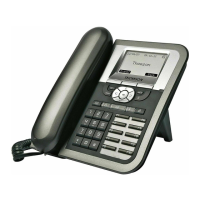
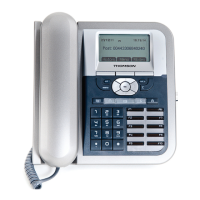
The Thomson ST2022 SIP is an IP phone designed for commercial environments, offering a range of features for communication and network integration. It supports both fixed IP and DHCP configurations, and its firmware can be updated via a web interface.
Function Description:
The ST2022 SIP is primarily a voice over IP (VoIP) phone, enabling communication over an IP network. It supports various communication modes and call services, including off-hook and on-hook operations, and mode switching during calls. The device can be configured through its integrated LCD screen or a web-based administration interface, providing flexibility in setup and management. It also includes features like voicemail, mute, and speed dial keys.
Important Technical Specifications:
- Connectivity: The phone features two RJ-45 ports, supporting 10/100 Mbps full-duplex Ethernet connections. One port is for the network (LAN) and the other for a PC.
- Power: It can be powered by either a main power unit (9VDC, 800mA linear) or Power over Ethernet (PoE) as defined by the 802.3af Standard. It is a Class 2 PoE device and supports class negotiation, allowing it to be powered up to 100 meters with category 5, 5e, or 6 cables.
- Power Consumption: The power consumption is under 6W.
- Headset Support: It includes an RJ9 headset connector for connecting a headset.
- Display: The phone has an LCD screen for displaying information and facilitating configuration.
- Compliance: It complies with European Council Directive 89/336/EEC for electromagnetic compatibility (EN55022 Class B for ITE and EN55024) and Directive 1999/5/EC. It also adheres to Northern America Federal Communications Commission (FCC) regulations (Subpart J of Part 15 of FCC rules) for Class B digital devices.
Usage Features:
- User Interface: The phone features a user panel with a dial pad, menu key, navigator keys, softkeys, audio keys, and dedicated keys for phonebook, voicemail, and volume control.
- Configuration:
- LCD Configuration: Users can assign an IP address (fixed IP or DHCP), set network parameters, and reset the phone to default settings directly from the LCD menu. The process involves navigating through menus like "Admin," "Networking," and "Option," using softkeys and the dial pad for input.
- Web Interface Configuration: For more advanced settings, the phone can be configured via a web browser by accessing its IP address with "/admin.html" appended (e.g., 10.0.0.1/admin.html). The web interface allows for setting up the call agent (SIP Servers properties and User Accounts) and upgrading firmware.
- LED Indicators: Various LED indicators provide status information:
- Speaker LED (Red): ON during FW boot or when the loudspeaker is active. OFF by default.
- Voicemail LED (Red): ON during FW boot, Slow blinking when voicemail is received. OFF by default.
- Mute LED (Red): ON during FW boot or when mute is active. OFF by default.
- Feature Keys LED (Green): OFF for speed dial keys in standby mode. OFF for line appearance in standby mode, Fast blinking for incoming calls, ON for active calls, Slow blinking for calls on hold or remote hold.
- System LED (Red/Green):
- Red ON: During FW boot.
- Red Slow blinking: During DHCP process, SIP registration, when Ethernet connection is down, or when IP connection is down (no IP address).
- Red Fast blinking: During auto-configuration (configuration file or firmware file download).
- Red ON: When system is programming FLASH.
- Green Slow blinking: During ringing state or for alert messages and missed calls.
Maintenance Features:
- Reset to Default: The phone can be reset to its factory default configuration by unplugging it, then plugging it back in while holding down the Mute and Headset keys.
- Firmware Upgrade: Firmware updates can be performed through the web interface under the "Utility" section. This involves browsing for the firmware file and uploading it, followed by a system restart.
- Telephone Configure (TelConf) File Upload: Similar to firmware, a TelConf file can be uploaded via the web interface to configure telephone settings, also requiring a restart.
- Backup and Restore Settings: The web interface provides options to backup current settings and restore from previously saved backups.
- Diagnostic Tools: A "Ping Test" is available in the web interface for network diagnostics.
- User Management and Phone Lock: Security features include user management and phone lock settings, configurable through the web interface.

 Need help?

 To Next Page
 General