- EN 16 -
Connecting to a Bluetooth Speaker
Note: This turntable has a Bluetooth receiver and can therefore ream your music through
the built-in speakers.
1. Press the Mode button to enter Bluetooth mode: the Bluetooth indicator will ash.
2. Turn on the Bluetooth function of your mobile phone and look for the TT-650
connection.
3. Once the connection is eablished, the Bluetooth indicator will remain on.
4. Press the VOL+/VOL- button to adju the volume.
Using Line Out
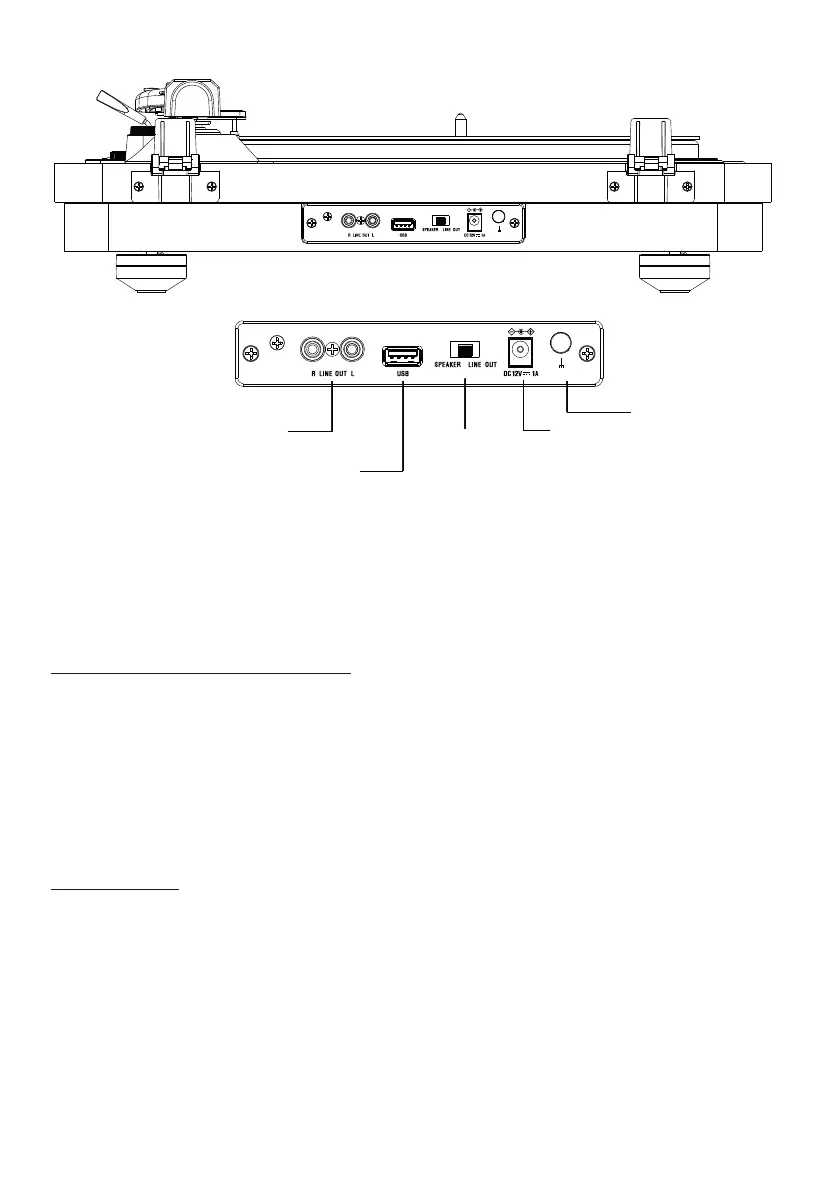
Requires RCA audio cable (included).
1. Connect the RCA audio cable (included) from the turntable’s Line Out socket to your
amplier.
2. Set playback mode to Phono.
3. The sound of the record being played will then be broadca by the connected amp/
speakers.
When the amplier
is connected to the
mains, connect the
amplier cable here.
Power supply
12V-1A
USB
Insert a USB
media to record
audio from the
turntable.
Line out
Audio Output Selector
In Speaker mode the amplier
is active and the sound comes
out of the turntable’s speakers.
In line-out mode, the amplier
is deactivated in order to
broadca sound from your
external HiFi syem. Volume +
and - functions remain active
but at a reduced volume.


 To Next Page