- EN 18 -
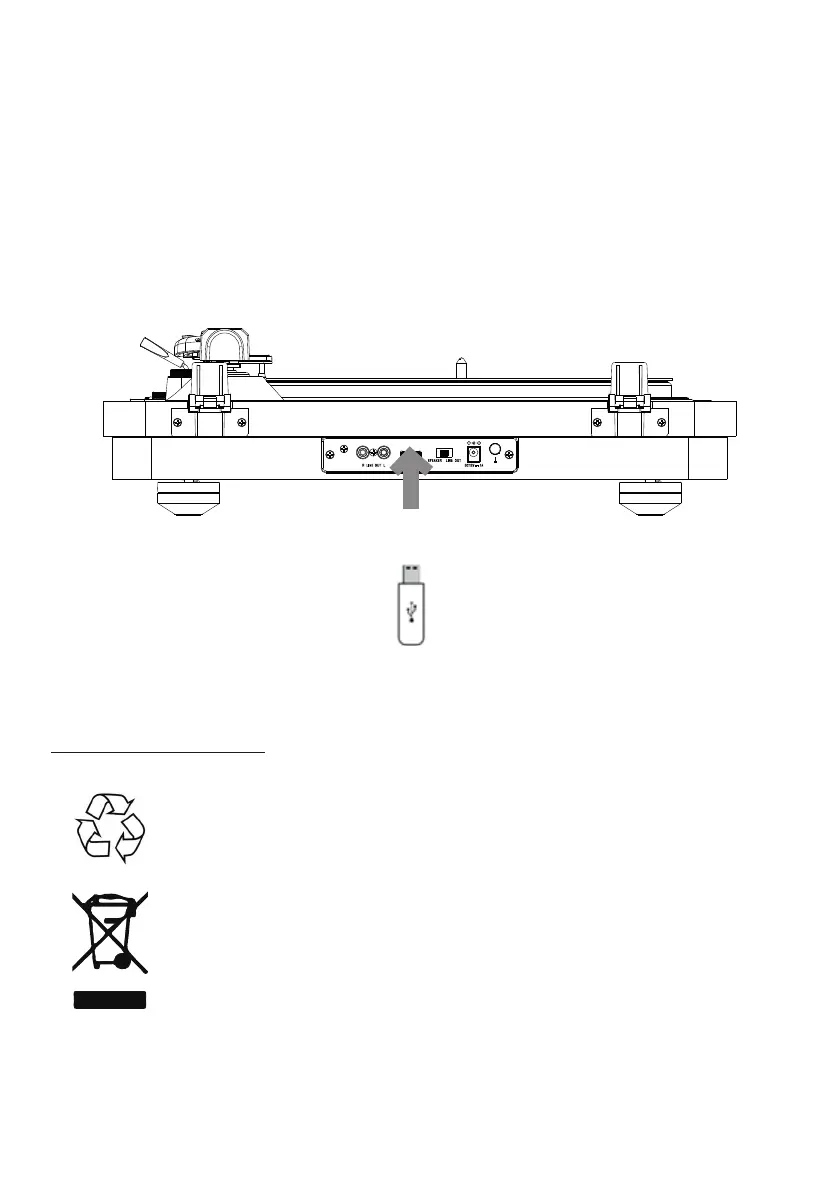
c) According to USB
1. This device can only record music from the turntable in MP3 format.
2. Insert the USB media into the USB socket, turn the device into turntable mode, and
art playing the vinyl disc you want to record.
3. Press the REC/op button and the USB indicator light will come on to indicate that
recording mode has been activated. When recording is complete, press the REC/
op button again to conrm. The desired tracks will have been recorded to your USB
media, and you can repeat the previous operations for other tracks.
* The USB indicator light remains on while in USB mode. To op recording, press the
Stop button, the disc will op and recording will end.
Note: the maximum connection diance is approximately 10 metres. Place your Bluetooth
speaker as close as possible to the device to avoid disruption of the connection.
Care for the environment
Your product has been designed and manufactured using high-quality
materials and components that can be recycled and reused.
Attention should be drawn to the environmental aspects of battery disposal.
When the crossed-out wheelie bin symbol appears on a product, it means
that the product is covered by European Directive 2002/96/EC. Please nd
out about the local sorting and collection syem for electrical and electronic
products. Please act according to local rules and do not dispose of your old
products in your household wae. By ensuring this product is disposed of
correctly, you are helping to prevent potentially negative consequences for
the environment and human health.


 To Next Page