EN
11
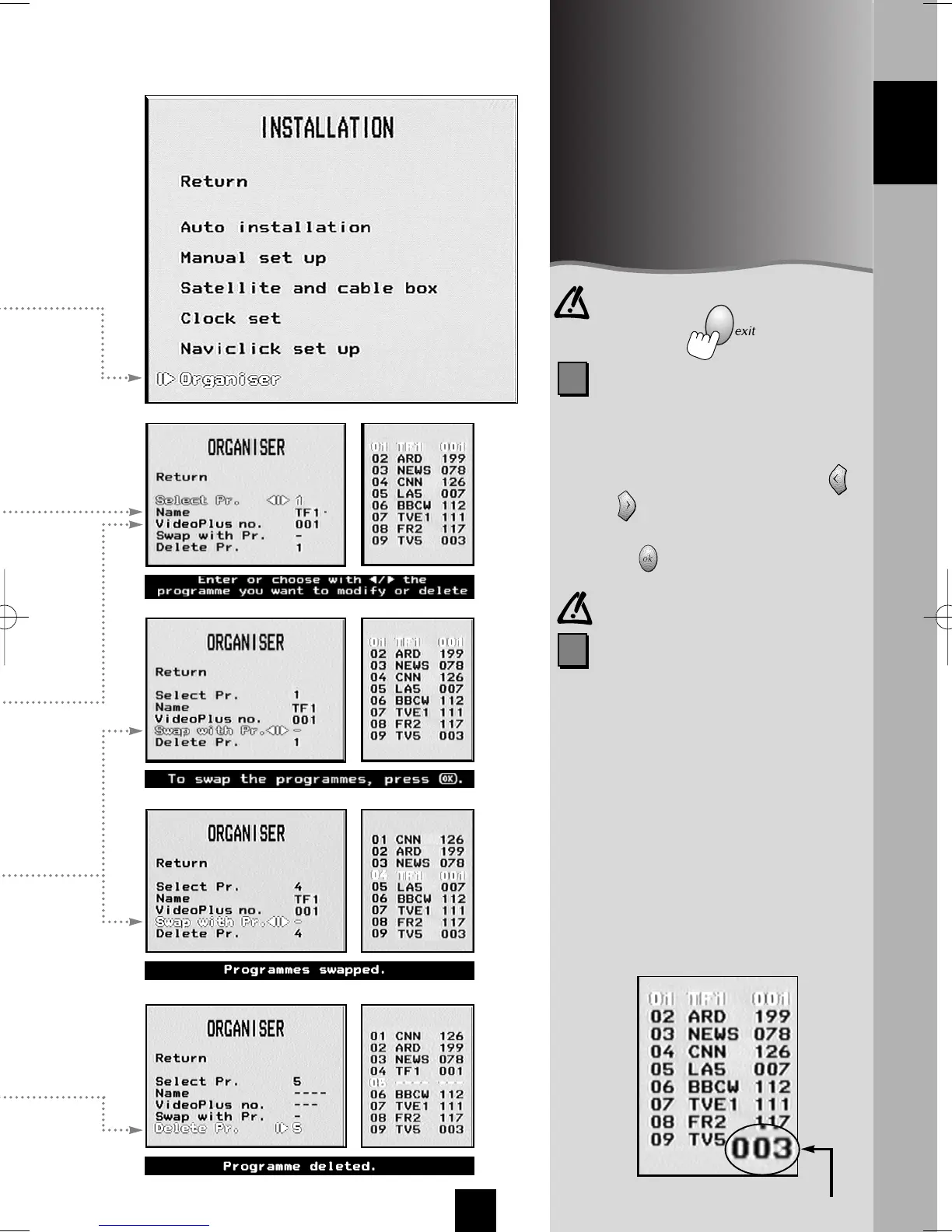
To :
- sort your channels,
- name a channel,
- assign a VIDEO Plus+ guide
number to each channel,
- delete channels that have not
been set up properly.
CHANNEL NAME
You can also change the channel
name by yourself:
By means of key 1 or 2, display the
desired character, then use key
or to switch over to the next
character.
Press to validate.
It is not possible to rename a satellite
channel
1
2
VIDEO Plus+ Guide number
(channel ID)
Check these numbers to make sure
that your VIDEO Plus+ programmed
recording is successful. Most TV
magazines contain a list of VIDEO
Plus+ guide numbers attributed to
the satellite and terrestrial channels.
If a VIDEO Plus+ timer program on a
channel has not worked properly
(wrong channel, wrong times), check
and correct the VIDEO Plus+ guide
number. The right part of the menu
lists the number, name and VIDEO
Plus+ guide number of the channels
by groups of ten.
VIDEO Plus+ guide number (channel ID)
In the case of an error or to
exit, press the key.
ENGLISH
I-T7089PE-GB/BEI/906 20/07/99 18:14 Page 11



 To Next Page