EN
15
Switch on your
satellite / cable
receiver.
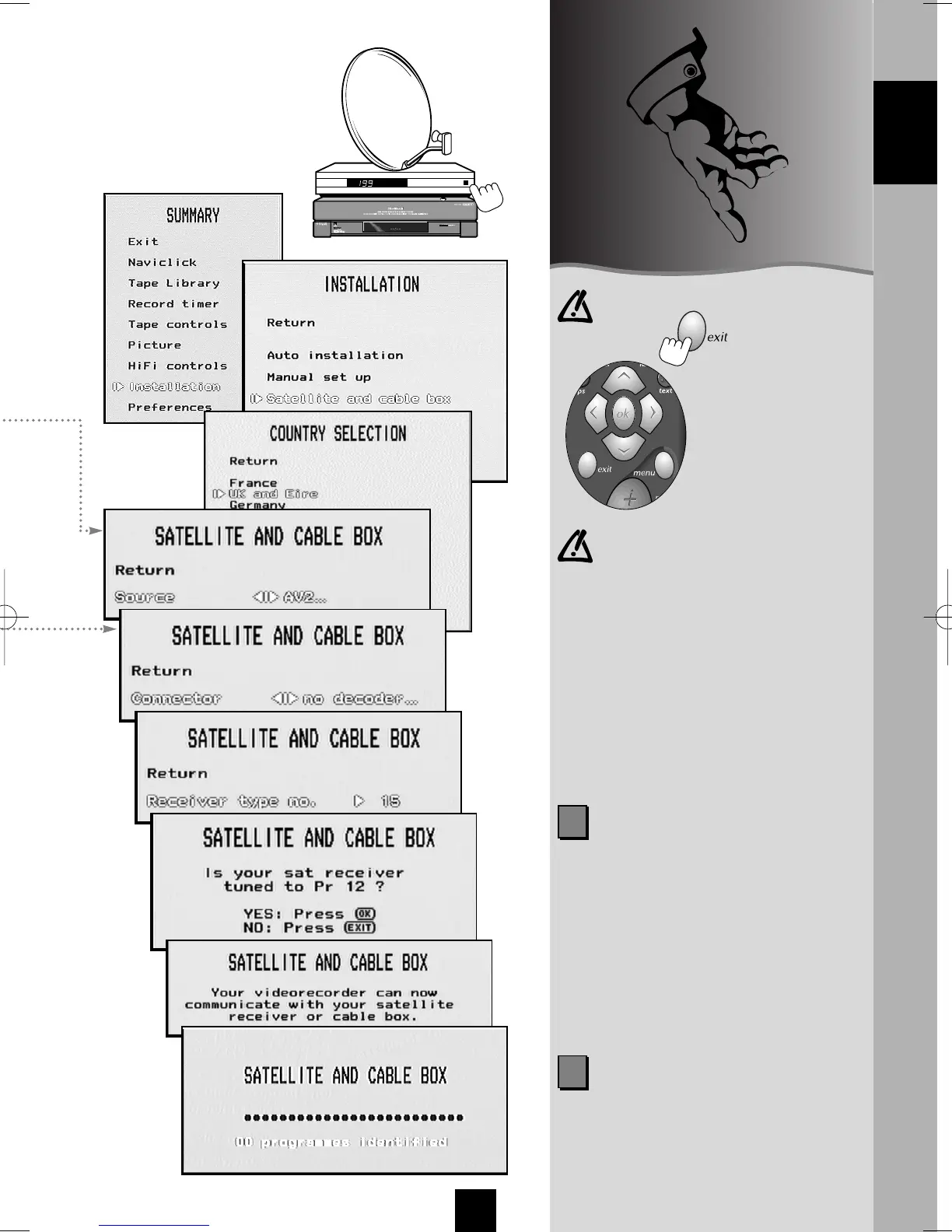
Your video recorder
can record programmes
on satellite channels.
To make it work properly,
you must first make the
adjustments described
on this page.
In the case of an error or to exit,
press the key.
IN THIS MANUAL
=
V
C
OK
B
W
exit menu
2
SAT code: to know the code of your
satellite receiver, turn to pages 16
and 17 of these instructions.
If none of the codes work, repeat the
procedure on this page, entering
code 00 in the first screen. The video
recorder tries all the codes in
memory (approximately 150). This
procedure can take a certain amount
of time.
ENGLISH
Note: Should you replace your
satellite receiver by another,
proceed as follows: select
Installation in the SUMMARY menu,
then Satellite and cable box and
New installation.
If you wish to reorganise the
channels of your satellite receiver,
proceed with the following steps:
select Installation in the SUMMARY
menu, then Satellite and cable box
and Sat programmes identification.
2
IMPORTANT: Channel 12 is not
steadily displayed on the decoder.
During the test (example: TPS), you'll
have to watch your decoder's
display until it briefly indicates the
number 12.
I-T7089PE-GB/BEI/906 20/07/99 18:14 Page 15



 To Next Page