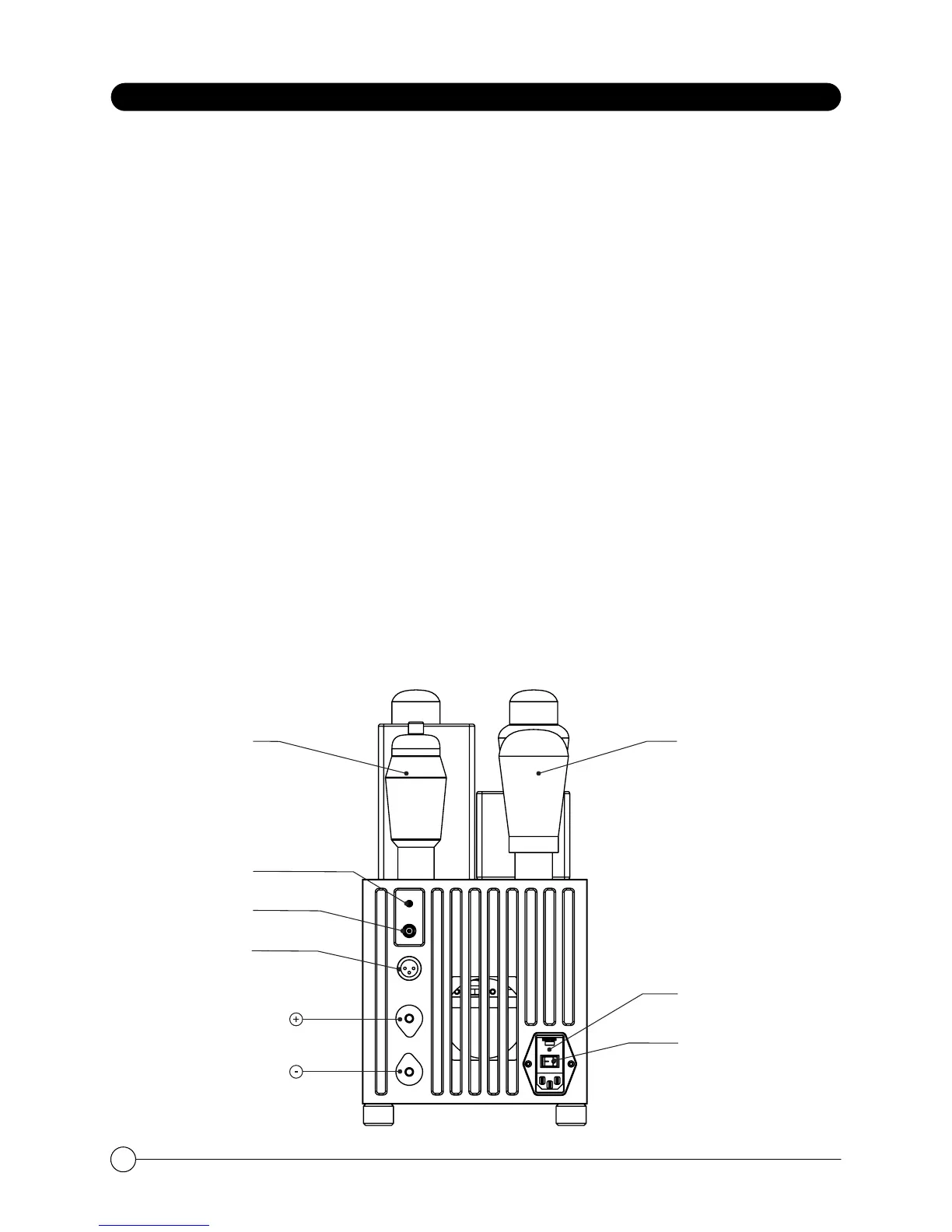
BACK PANEL
Inputs
A XLR jack is provided for balanced connection to a pre-amplifier.
The "INPUT SELECT" switch is set to the BALANCED (down) position - the switch lights red.
RCA (single ended) connection normally is made to the RCA jack.
The INPUT SELECT switch is set to “RCA” (up) - the switch lights green.
NOTE: Do not remove and connect input cables or speaker cables while is amplifier is
running. Doing so risks damage to your loudspeakers or the amplifier. Do not operate the
amplifier without a loudspeaker.
Speaker output
The speaker cables connect to the Speaker Connectors. Either banana jacks, bare wires
or spade plugs can be used. If bare wire is used, be careful that no stray strands get loose
that could cause a short-circuit. The “Common” or “Ground” lead connects to the black
jack. The “Hot” lead goes to red jacks. Bare wires and spade plugs must be tighten by
rotating the ratchet screw clockwise.
A/C Fuses
There are fuses located in the IEC power connector on the back panel. For 220 volt
operation 6.3 amperes "slow blow" fuses are used. For 110 volt operation the fuses should
be 10.0 amperes. If power does not come on, contact your authorized service
representative or consult the factory for more information.
PX25Г811
Switch RCA/XLR
RCA Inputs
XLR Inputs
Speaker
Fuses
Mains
ON/OFF
8



 To Next Page