16/18
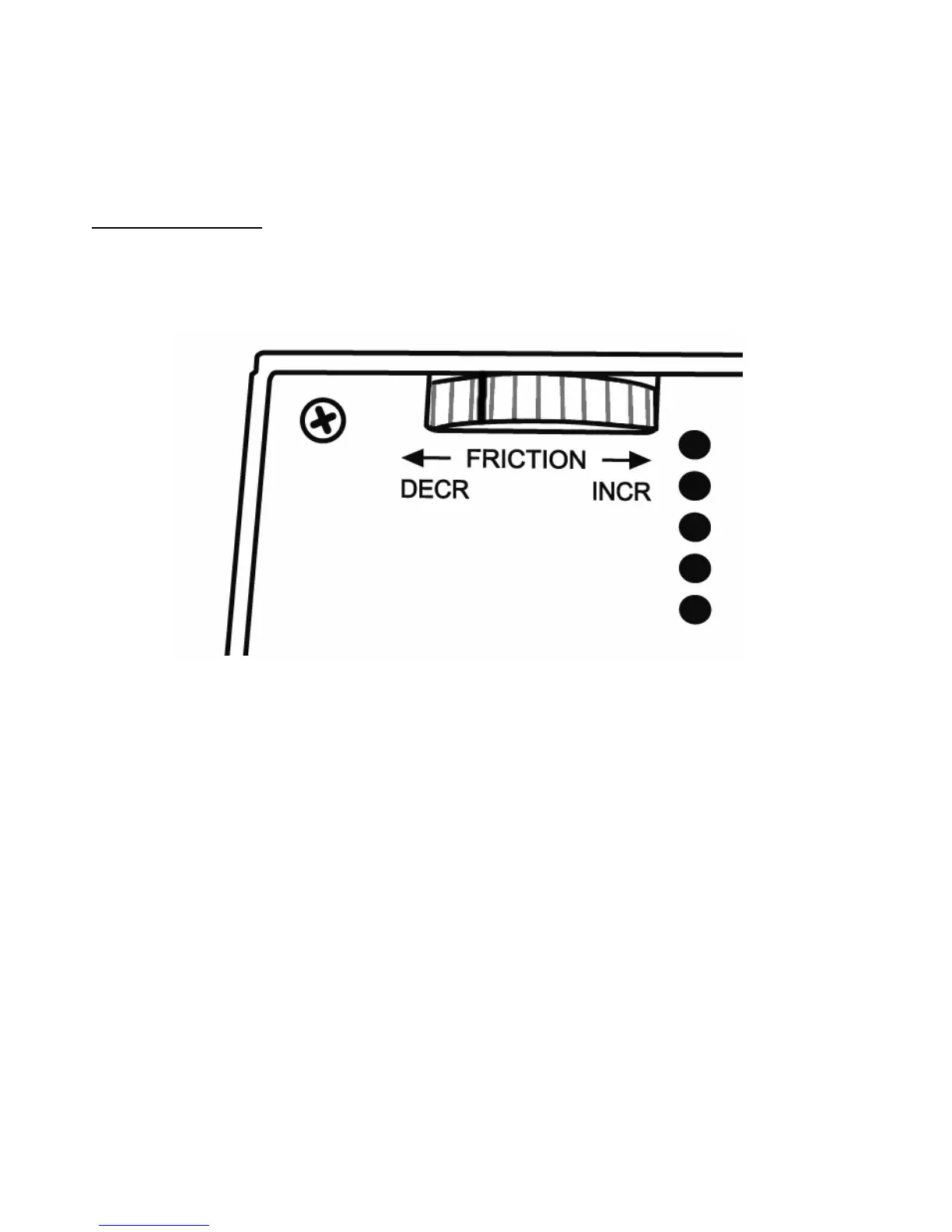
THROTTLE ADJUSTABLE FRICTION SYSTEM
- To increase the friction: turn the wheel to the right.
- To decrease the friction: turn the wheel to the left.
IMPORTANT NOTES
:
- Friction on the dual throttles is set to the minimum value by default.
- In order to allow for precise adjustment according to your taste, roughly ten full turns must
be made to go from minimum friction to maximum friction.
- You can use the white mark, found on the wheel, to help count your turns, if necessary.
BACKWARDS-COMPATIBILITY
The new “HOTAS Warthog” handle is backwards-compatible with the base of the “HOTAS
Cougar” (and vice versa).
Only the CMS push button (button 19) will be non-functional, as it was not originally featured
on the HOTAS Cougar.
CONTROL PANEL BACKLIGHTING
The intensity of the control panel's backlighting can be adjusted directly via T.A.R.G.E.T
(Thrustmaster Advanced pRogramming Graphical EdiTor). Five different levels of intensity
are available: from 1 (minimum intensity) to 5 (maximum intensity), with the default level set
at 2.
MANAGING THE 5 PROGRAMMABLE LEDS
You can manage the Control Panel’s 5 programmable LEDs directly via T.A.R.G.E.T.
(Thrustmaster Advanced pRogramming Graphical EdiTor).









 To Next Page