5
Specifications
VIEW AND PROGRAM SETTINGS
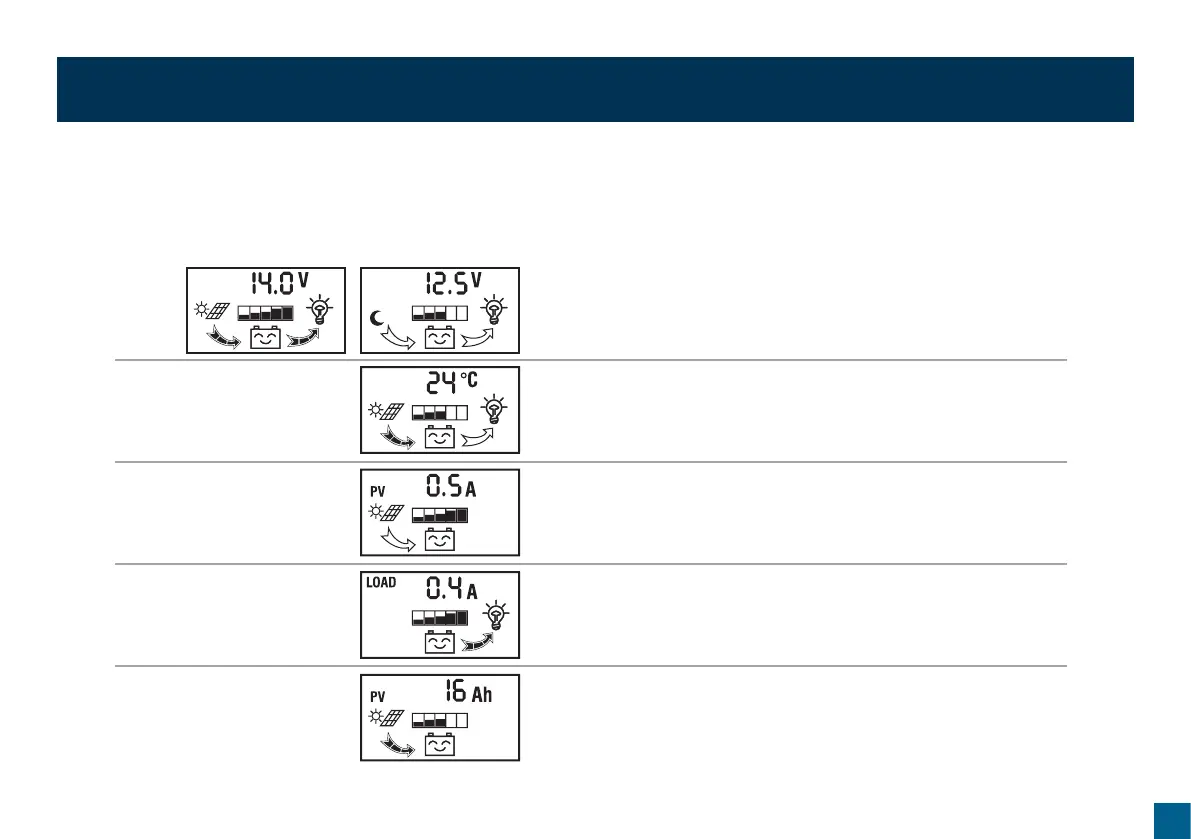
The regulator will default to the “battery voltage” screen after correct installation to battery. Use the menu button to switch view to desired screen.
Press the menu button to cycle from on view to the next.
Battery Voltage
Displays current battery voltage, charge status, discharge status and
battery capacity. In this screen, press and hold the menu button
(>5 seconds) to shut off the load circuit.
Environment Temperature
Displays current temperature, charge status, discharge status and battery
capacity.
Solar Panel Charge Current
Displays the charging current from the solar panel and battery capacity.
Load Discharge Current
Displays the discharge current and battery capacity.
Accumulated Charge (Ah)
Displays the total amount of charge received from the solar panel in amp
hours since connection/last reset. To reset to 0, press and hold the menu
button (>5 seconds).


 To Next Page