34
vd84-201113
5 Configuration
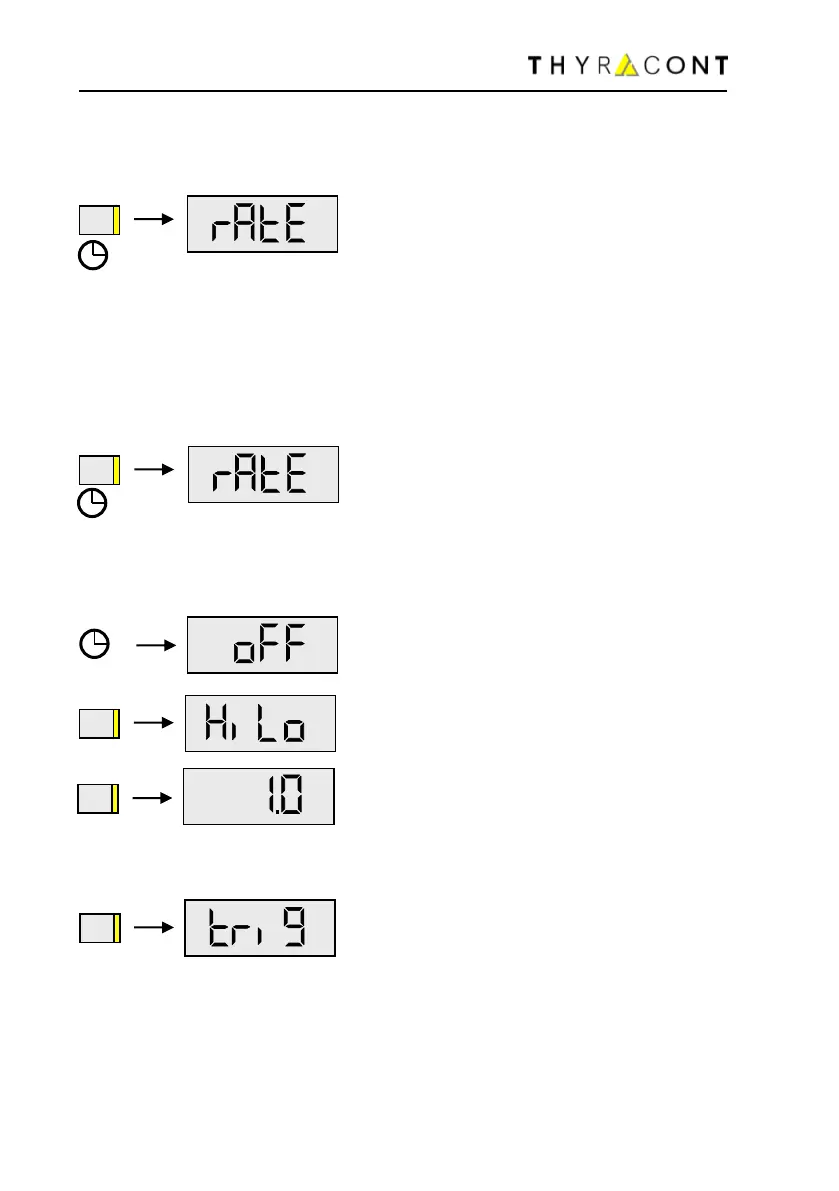
To switch the VD84 into Configuration Mode:
with the instrument switched-off hold the
Mode-Key pressed for approx. 5 seconds, un-
til the display shows ‘’rAtE’’.
5.1 Logging Rate
To set the logging rate of your VD84 and thereby activate the data logging func-
tionality, switch the unit into Configuration Mode. For this the instrument must be
switched-off. Hold the Mode-Key pressed then, until the display shows ‘’rAtE’’:
After additional 5s the current rate setting for internal data logging is displayed
and can now be adjusted by means of the Mode-Key:
off, HiLo, 1,0s / 2,0s / 10s / 1min / 10min und trig.
"off" : data logging is disabled.
"HiLo" means that only minimum and maxi-
mum pressure is stored. These values can be
displayed but cannot be transmitted to a PC!
Save measurements every 1.0 seconds.
…
"trig" means that new measurements are
saved only if the new value differs more than 2
digits from the one that was stored last (e.g.
2.3 → 2.5). Data volume is reduced this way
and optimum memory utilization achieved.
When data logging is active minimum and maximum pressure are recorded sim-
ultaneously.


 To Next Page