7
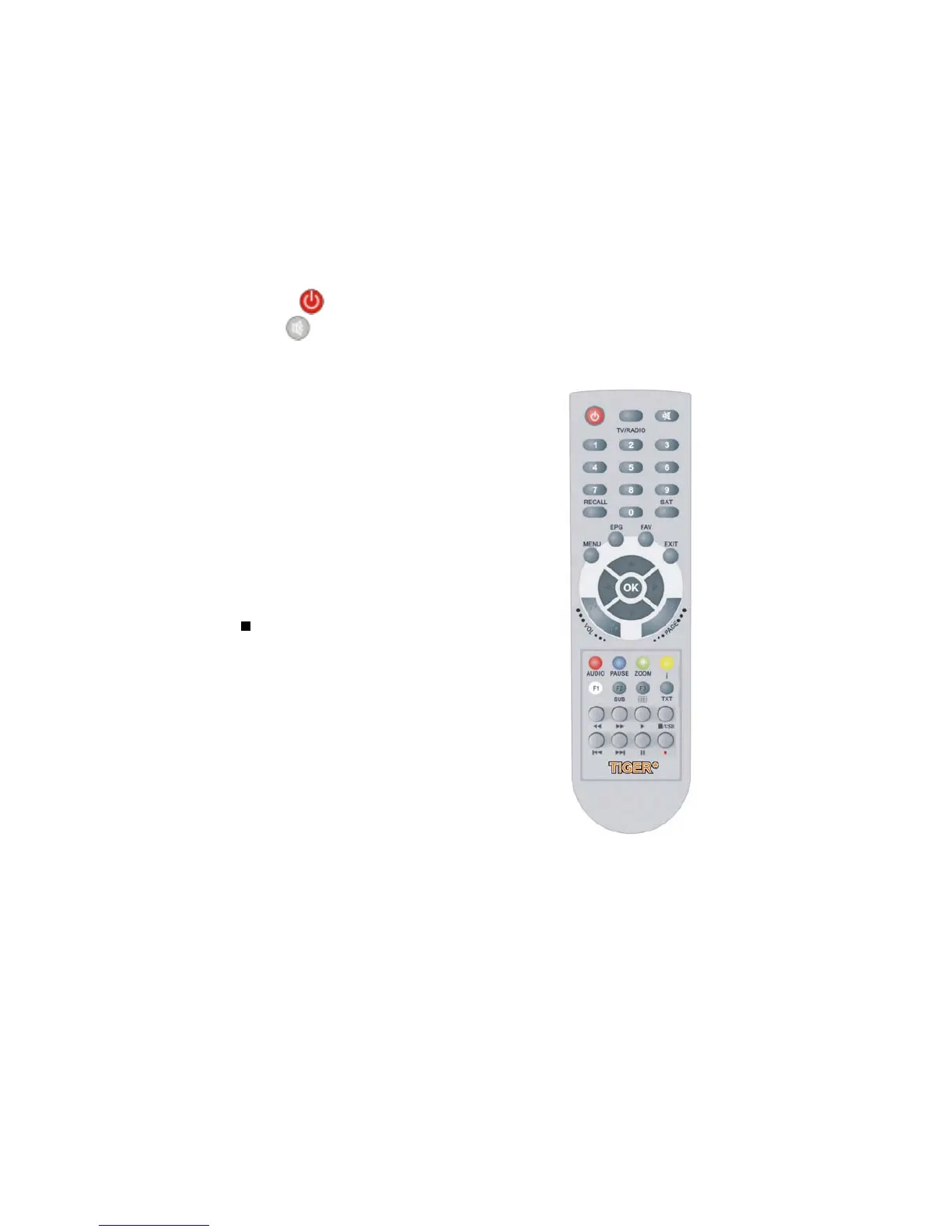
2.3 Remote Control Unit(RCU)
Figure 4. Remote Control Unit
You can control this receiver by this remote controller with full function.
1. POWER : Switch the receiver on or set it to standby mode.
2. MUTE : Turn the sound On/Off.
3. NUMERIC KEY (0~9):
Change program or input number.
4. TV/RADIO : Switch between TV and RADIO.
5. RECALL : Move to the previous viewed channel.
6. SAT : Show the scanned satellite list.
7. MENU : Activate main menu or exit to
live channel.
8. EPG (Electronic Program Guide):
Show the TV/Radio program guide.
9. FAV : To get favorite channel list you set before.
10. EXIT : Exit current menu step by step.
10. /USB : Activate USB Menu / Stop
recording or playing.
11. Page S/T : Page up/down on menu.
12. CHS/T : Change channel.
13. VOLW/X : Change volume
14. OK : Confirm the highlighted menu item.
Open the channel list.
15. AUDIO : Select or change the Audio.
16. PAUSE : Freeze the picture.
17. ZOOM : Picture Zooming function.
18. INFO (i) : Show the information of the
current channel. Press EXIT button to exit
this menu.
19. F1.SLEEP : No function.
20. F2.SUB : Showing Subtitle information if the channels contains.


 To Next Page