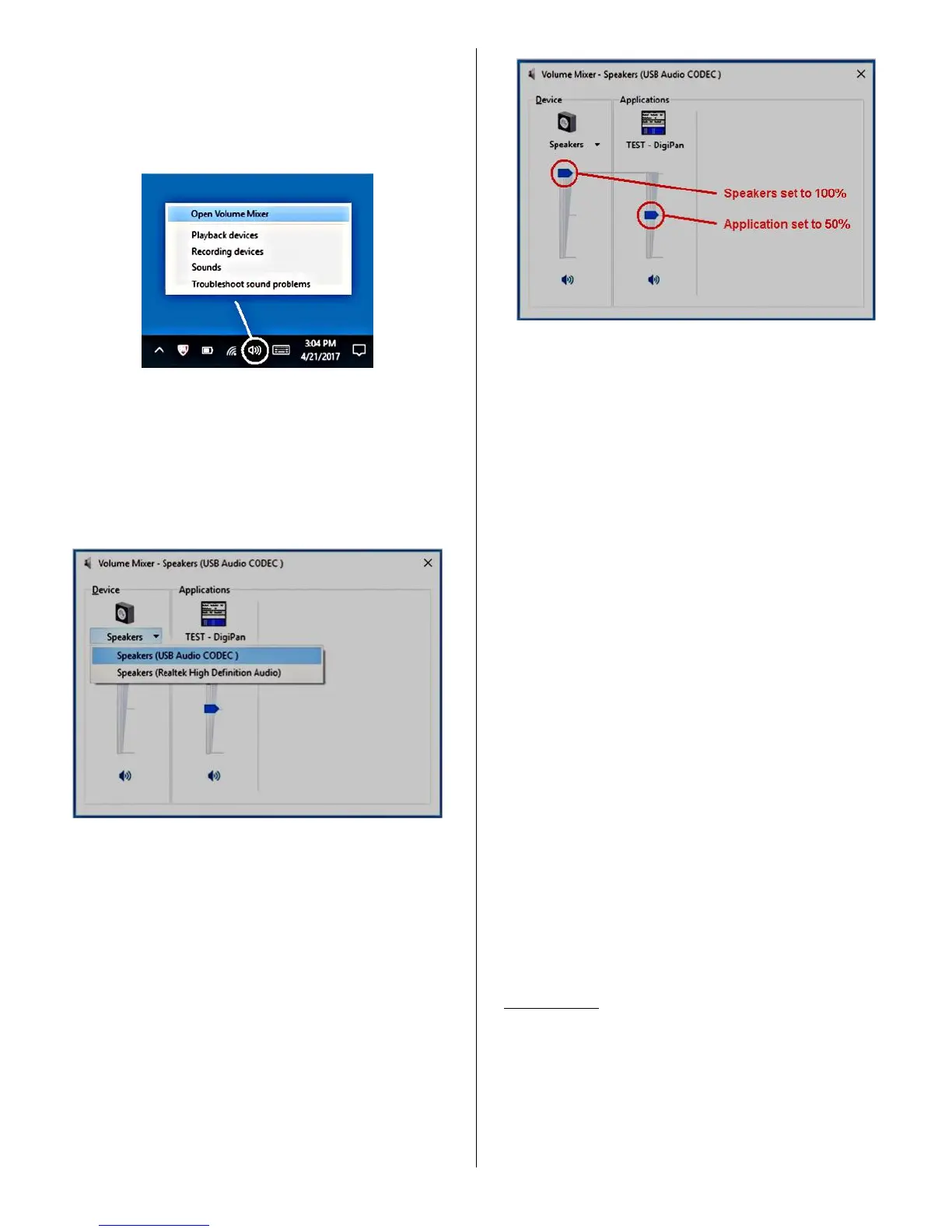
• As shown below in Figure 4, locate the white
speaker icon on the Windows task bar (lower right-
hand corner of the Windows desktop).
Right-click it and select "Open Volume Mixer".
Figure 4 – White speaker icon
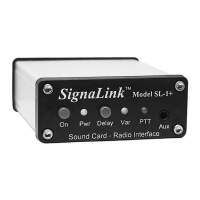
• In the Volume Mixer window that opens, click the
drop-down menu below the speaker icon and select
"Speakers (USB Audio Codec)" as shown below in
Figure 5.
Figure 5 – Volume Mixer selection
• You should now see a volume mixer window
similar to the one shown below in Figure 6. Note
that the Applications volume control will display
the name of the communication program that you
are using or something similar (we've used the
DigiPan program for our example). If you do not
see the Applications volume control, then you will
need to close this window, put your program in
Transmit and then re-open the window. If you still
do not see the Applications volume control, then
double-check that your communication program is
properly configured and actually in Transmit (see
“Communication Program Setup” above).
Figure 6 – Volume Mixer adjustment
• Adjust the Speakers and Applications volume
controls as shown above. The Speakers volume
control MUST be set to 100%, and the Applications
volume control MUST be set to 50%. If these are
not set correctly, then the SignaLink USB's PTT
LED will NOT turn on, and you will be unable to
Transmit.
• The SignaLink’s software Playback controls are
now set to provide an audio level that will reliably
activate the SignaLink's PTT circuitry and provide
a good Transmit Audio level for most radios.
• The SignaLink’s red PTT LED should now be ON,
and your radio should be in Transmit. If the PTT
LED is not ON, then you may have the wrong
sound card selected in your communication
program or the software volume controls are not set
correctly. If you cannot get the SignaLink's PTT
LED to turn ON, then see the “Troubleshooting”
section at the end of this manual.
• You should now be able to adjust the SignaLink's
“TX” level control for the desired Transmit power
level (see important note below). If you cannot get
adequate power, or if you have too much power, or it
is difficult to adjust, then please see the
“Troubleshooting” section at the end of this manual.
• Turn your program’s Transmit function OFF when
you are finished making the TX level adjustments.
IMPORTANT: We strongly suggest that you consult your
radio manual to verify the recommended maximum transmit
level and duty cycle. Most digital modes are 100% duty
cycle and cannot be run at full power without damaging
your radio. Also, some modes typically require only 25
watts or less for reliable communication. You can actually
“swamp” out other PSK31 users if you use too much power.


 To Next Page