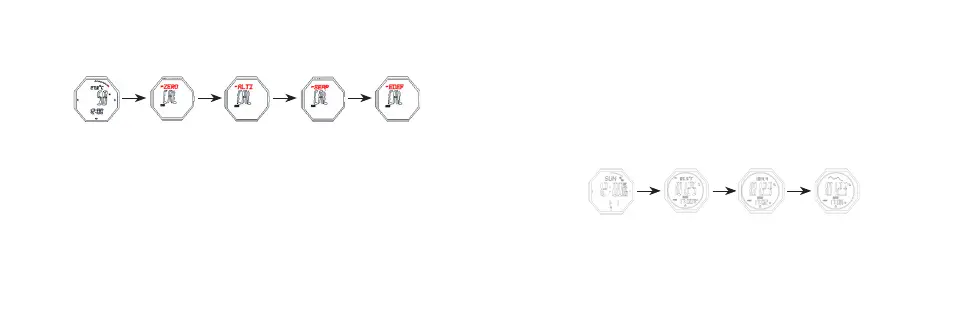
Altitude Seing
- Press buon B for 2s to enter altitude seing mode,press B to move and set the
following items:
Relative altitude seing (ZERO)
- Press E/C to shi“YES”/“NO”,when it is YES, that means the relative altitude
is 0, the r will occur on screen, when NO, that means use the default value
(work out according to default sea level atmosphere 1013.25mb).
Input your current altitude
- Input your current altitude (ALTI)
- Press E to increase the value, press and hold E to advance quickly.
- Press C to decrease the value, press and hold C to decrease quickly
- Press buon B for 2s to confirm, return to altitude measurement mode
B for 2s B B B
Humidity On Top Set Relative Altitude Adjust Relative Altitude Set Sea Level Atmosphere
Value
Reset
Input sea level atmosphere value (SEAP)
- Press E to increase the value, press and hold E to advance quickly.
- Press C to decrease the value, press and hold C to decrease quickly
- Press buon B for 2s to confirm, return to altitude measurement mode
Factory default sea level atmospheric pressure value (FDEF)
- Press E/C to shi“YES”/“NO”,when it is YES, that means use the default
value 1013.25mb
10. Atmospheric Pressure Measurement Mode
E E E
Timekeeping Mode Display Temperature Display SEAP Display Trend
- In timekeeping mode, press buon E to enter atmospheric pressure measurement
mode
- Press E to shi the display: temperature → sea level atmospheric pressure → trend



 To Next Page