9
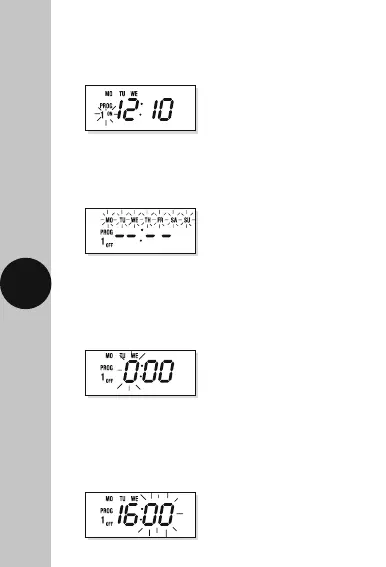
• Press the right arrow button ’→’ to select the
minutes (in this case 10). Press the ‘SET’ button
to save, and ‘Prog 1 ON’ will start to flash.
• Press the right arrow button ’→’ to select
the hour of your OFF time (in this case 16).
Press the ‘SET’ button to save, and the minute
digit will start to flash.
• Press the right arrow button ’→’ to select the
days/day group used for ‘Prog 1 ON’ (in this case
MON,TUE,WED). Press the ‘SET’ button to save,
and the hour digit will start to flash.
• Press the right arrow button ’→’ to change the
‘Prog 1 ON’ to ‘Prog 1 OFF’. Press the ‘SET’ button
to save, and the days/day groups will start to flash.












 To Next Page