
 Need help?
Do you have a question about the Timeguard NTT03 and is the answer not in the manual?
Instructions should be read carefully and retained for future reference and maintenance.
Ensure mains supply is switched off and circuit fuses are removed or breaker turned off before installation or maintenance.
It is recommended that a qualified electrician is consulted for installation according to current IEE wiring and Building Regulations.
Check that the total load on the circuit does not exceed the rating of the circuit cable, fuse, or circuit breaker.
Specifies 230V AC 50 Hz supply and load ratings for various appliances like immersion heaters and lighting.
Details the switch type as a 16A relay, with voltage-free contacts available for NTT04, normally open.
Includes minimum wall box depth, manual override options, LED indicators, programming capacity, operating temperature, and CE approval.
Important note stating the product is not suitable for use with Discharge Lighting.
Reiterates ensuring the mains supply is switched off before commencing installation.
Instructions on removing the bezel and easing the module forward to access the terminal block.
Details on terminating supply and load cables to the wall plate terminal block, ensuring correct polarity.
Steps for fitting wall mounting screws and re-positioning the timer module and bezel.
Diagram and connection details for NTT03 model for 230V mains voltage switching.
Diagram and connection details for NTT04 model in 230V mains voltage switching mode, including bridging.
Diagram and connection details for NTT04 model for voltage-free switching, e.g., 24V lighting circuits.
Note that the device requires a minimum of 15 minutes charging after power-up before it will operate.
Explains the factory-fitted rechargeable battery for clock operation and memory backup during power loss.
Instructions to connect to mains for at least 15 minutes before first-time programming.
Advice to charge for 4 hours if the display is not visible or very faint before programming.
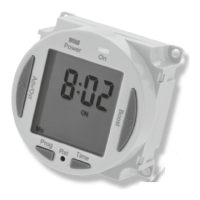
Details on pressing the Reset (Rst) button with a pointed object and observing display feedback.
Guidance on using the Adv/Ovr button to set the automatic summer time adjustment (ON/OFF).
Step-by-step guide to setting the year, month, day, hour, and minutes using the Time and Adv/Ovr buttons.
Instructions for programming 4 independent ON/OFF periods, with options for 7-day, 5+2-day, or individual day programming.
How to select day grouping modes (24hr, 5 day, Individual day) using the Adv/Ovr and Prg buttons.
Detailed steps for setting the hour and minute for each ON and OFF period within the selected day grouping.
Procedure for setting ON/OFF times that cross midnight, including setting OFF/ON times to 00:00.
Instructions on how to modify or add programmes, including changing the day mode and reviewing/adjusting times.
Explains how the Adv/Ovr button advances the programme to the next time change or sets permanent ON/OFF modes.
Details on using the Boost button to provide 1 or 2 hours of boost, and how to cancel it.
Information on the product's 3-year guarantee, including return procedures and proof of purchase requirements.
Provides helpline number, email, and company contact details for support and product brochures.










 To Next Page
 General