8
• Use the Adv/Ovr to increase (or the Boost
buttons to decrease) the value and set
to the correct year.
• Press the Time button once to
save the year, and the screen
with show the month;
• Use the Adv/Ovr or
boost button to set
the correct month.
• Press the Time button once
to save the month, and the
screen will show the day;
• Press the Time button once
to save the day, and the
screen will show the time –
hour first;
Note: The hour is in
24 hour format.
• Use the Adv/Ovr or boost button to adjust
to the correct hour.
• Press the Time button once to save the hour,
and the minutes can be adjusted.
• Use the Adv/Ovr or boost button to adjust
to the correct minutes.
• Press the Time button once to exit
the Time/date entry mode.
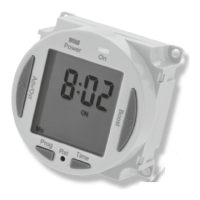
• The display should now
show the correct time/day
of the week, for example;
Modifying the date and time of day
Normally the only change required will be
to the time of day minutes, in which case;











 To Next Page