EasyManua.ls Logo

Timex 25 - Remove Date Wheel and Ratchet Wheel; Remove Crown and Stem Assembly

Timex 25
9 pages
Print Icon
To Next Page IconTo Next Page
To Previous Page IconTo Previous Page
Loading...
Disassembly
of
Movement
for
Cleaning
Cont'd.
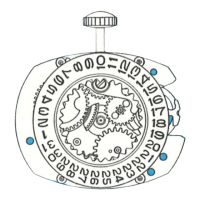
RATCHET WHEEL
w
RATCHET
WHEEL
CROWN
SSTEM
ASSEM
l
SET
LEVER
SCREW
SET
LEVER
25.4
'
'
'
DATE
WHEEL
Removing the Date
Wheel
and
Ratchet
Wheel
ASSEMBLY
The
next
step
in
preparing
the
move-
ment
for
cleaning
should
be
the
re-
\
CROWNS
STEM
ASS
EM.
moval
of
the
date
wheel
and
ratchet
wheel.
Proceed
as
follows :
a)
Remove
the
date
wheel.
b)
Grasp
the
crown with
the
fingers
of
one
hand
and
release
the
click
by holding
the
click
away
from
the
ratchet
wheel.
Let
the
crown
revolve slowly
in
the
fingers
being
careful
not
to
let
the
crown
slip.
c)
When
the
mainspring
has
been
fully let
down, remove
the
ratchet
wheel
washer
and
ratchet
wheel.
Note
:
Ta
remove
the
ratchet
wheel
washer,
lift
one
side
free
of
the
lancing
in
the
ratchet
wheel
and
revolve
t
h e
washer
approximately
V4
turn
.
Removing the Crown
and
Stem
Ta
remove
the
crown
and
stem
as-
sembly,
invert
the
movement
sa
that
the
movement
plate
is
facing
you.
Turn
the
set
lever
screw
approxi-
mately
one
turn
and
lift
the
tail
of
the
set
lever
out
of
engagement
with
the
stem.
The
crown
and
stem
can
naw
be
removed.

Related product manuals