
 Need help?
Do you have a question about the Timex Metropolitan+ and is the answer not in the manual?
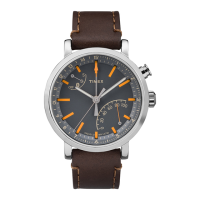
Key features and specifications of the Timex Metropolitan+ watch.
Requirements for the companion smartphone application and device compatibility.
Instructions on how to set the correct time on the watch.
How to activate and use the watch's night-light feature.
Procedure to realign the watch's 4th center hand if it's misaligned.
Switching between steps and distance tracking modes on the watch.
Entering Bluetooth mode for synchronization with a smartphone.
How to turn off the activity tracking function to save battery.
Instructions for downloading and installing the Timex Metropolitan+ app.
Completing the initial setup wizard within the smartphone app.
Inputting personal details like age, height, weight, and gender.
Configuring general app and watch settings, including units.
Setting daily activity goals for steps, distance, and calories.
Setting specific daily goals for steps, distance, and calories.
Accessing advanced settings and firmware check options.
Putting the watch into Bluetooth sync mode.
Initiating the synchronization process from the app interface.
Regulatory compliance information regarding radio frequency.
 General
| Waterproof | Yes |
|---|---|
| Band material | Leather |
| Lens material | Glass, Mineral |
| Product color | Beige, Brown, Brushed steel |
| Water resistance | 5 ATM |
| Waterproof up to | 50 m |
| Market positioning | Sport watch |
| Protection features | Water resistant |
| Watch case material | Stainless steel |
| Compatible operating systems | Android, iOS |
| Battery type | Built-in battery |
| Rechargeable battery | No |
| Memory capacity | 0 entries |
| Recommended activity | Fitness, Golf, Hiking, Running, Tennis |
| Height | 12 mm |
| Backlight type | LED |
 Weight and Dimensions
| Width | 42 mm |
|---|





 To Next Page