
 Need help?
Do you have a question about the Timex Metropolitan R and is the answer not in the manual?
How to charge the watch using the magnetic charging cable and a USB port.
Details the watch's 30m water resistance rating and limitations for swimming.
Information on GPS functionality, updates, and optimal wrist placement.
Explanation of how accelerometer and heart rate sensor track activity and sleep.
Step-by-step guide to download the app and pair the watch with a smartphone.
Understanding the watch's physical buttons and touchscreen navigation basics.
How to use swipes on the touchscreen to access menus and features.
Accessing the Activity Status page from the main menu.
Accessing the Heart Rate page from the main menu.
Starting a workout by selecting the desired workout type from the main menu.
Using the compass, air pressure, and altitude features with calibration.
Using GPS for outdoor workouts and ensuring accurate recording.
Setting target goals for workouts such as distance, duration, or calories.
Viewing activity charts and graphs for steps, distance, and calories.
 General
| Brand | Timex |
|---|---|
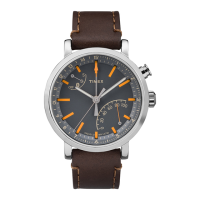
| Model | Metropolitan R |
| Category | Watch |
| Type | Smartwatch |
| Case Size | 42 mm |
| Case Material | Stainless Steel |
| Connectivity | Bluetooth |
| Movement | Quartz |
| Band Material | Silicone |
| Case Diameter | 42 mm |
| Band Width | 20 mm |
| Water Resistance | 30 meters |
| Sensors | Heart Rate, Accelerometer |
| Features | Notifications, Sleep Tracking |
| Compatibility | Android, iOS |
| Battery Life | Up to 2 weeks |





 To Next Page
