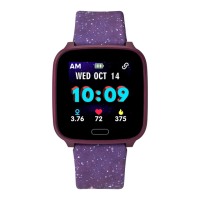
The iConnect Kids Active smartwatch is designed to help children stay active and connected, offering a range of features that promote physical activity, monitor sleep, and provide convenient notifications. This user-friendly device is paired with the iConnect By Timex 2 App, available on both Apple APP Store and Google Play Store, ensuring seamless integration with most modern smartphones.
Function Description
The primary function of the iConnect Kids Active is to track and encourage physical activity. It records daily steps, calories burned, and distance covered, providing a comprehensive overview of a child's activity levels. This data can be viewed directly on the watch and is synchronized with the companion app for more detailed analysis. The watch also includes a "Motion Record" feature, allowing users to track specific workouts such as walking, running, biking, hiking, and indoor runs. For each workout, the watch can record distance, time, and calories, and users can set target goals for these metrics. The app provides real-time location tracking during workouts, which can be viewed on a map.
Beyond activity tracking, the smartwatch incorporates a heart rate monitor. Users can initiate a heart rate measurement by pressing and holding the touch button for 3 seconds. The watch will display real-time heart rate data after about 15 seconds and automatically stop measurement after 40 seconds. The app also allows for real-time heart rate measurement with a trajectory map.
Sleep monitoring is another key function. The watch automatically tracks sleep patterns from 10:00 PM to 9:00 AM, recording the previous night's sleep duration. This sleep data is then synchronized with the app, providing insights into sleep quality based on nocturnal movements.
Connectivity features are central to the iConnect Kids Active. Once paired with a smartphone via Bluetooth, the watch receives notifications for incoming calls, messages, and alerts from various third-party applications like Facebook. The watch can store up to 5 unread messages. It also offers remote music control, allowing users to play, pause, skip tracks, and go back to previous songs directly from the watch when connected to the app.
For entertainment, the watch includes a simple basketball game that can be controlled with single touches on the tap button. A stopwatch function is also available, allowing users to start, pause, reset, and quit time counting with simple touch button interactions.
Usage Features
The iConnect Kids Active is designed for ease of use, primarily relying on a single touch button for navigation and interaction.
- Navigation: A single tap on the touch button allows users to scroll through different screens and access various watch features, including clock display, activity, heart rate, weather, messages, sleep, music, games, sports, stopwatch, brightness, and shutdown.
- Watch Faces: The watch offers multiple customizable watch faces, allowing children to personalize their device.
- Pairing: To connect the watch to a smartphone, users need to enable Bluetooth on their phone, open the iConnect By Timex 2 App, and select "Pair my watch." The app will scan for the device, and users can then tap "Pair" to establish the connection. For iPhone users, a "Bluetooth require to pair" dialog will appear, requiring confirmation.
- Personal Data: The app allows users to set up personal data such as nickname, gender, birthday, height, and weight. This information helps the app more accurately estimate calorie consumption and tailor sport programs.
- Add Friends & Leaderboard: Users can add friends by searching for their email addresses in the app, enabling friendly competition based on daily activity. A "Leaderboard" feature displays rankings among added friends.
- Units & Temperature: The app allows users to switch between Imperial and Metric units for displayed parameters and choose between Celsius and Fahrenheit for temperature readings.
- Find Watch: If the watch is misplaced, the "Find Watch" feature in the app can make the paired watch vibrate, helping users locate it.
- Schedule Setting: Users can set schedules in the app, and the watch will display alerts when the scheduled date and time are reached.
- Sedentary Reminder: The app allows users to set a sedentary reminder, which will cause the watch to vibrate if the user is inactive for a set period (e.g., 1 hour).
- Drinking Reminder: Similar to the sedentary reminder, users can set a drinking reminder to prompt them to drink water at specified intervals.
- Alarm Setting: Up to 5 alarms can be set through the app, with options for daily or specific days of the week. The watch will vibrate when the alarm time is reached.
- Remote Camera Control: When connected to the phone, users can open the camera in the app and tap the watch's touch button to remotely take photos.
- Do Not Disturb Mode: This mode allows users to disable notifications and vibrations on the watch for a specified period, preventing interruptions.
- Turn Wrist to Wake: This feature enables the watch screen to wake up automatically when the user turns their wrist.
- Time Display: Users can choose between 12-hour or 24-hour time formats.
Maintenance Features
The iConnect Kids Active is designed with durability and longevity in mind, with several features and recommendations for maintenance.
- Water Resistance: The watch is rated IP68 for dust and water resistance, meaning it can withstand submersion in fresh water up to a maximum depth of 1.5 meters for up to 30 minutes. However, users should avoid overexposure to moisture and excessive submersion.
- Charging: The device comes with a bundled charging cable. When using the device for the first time, it should be charged, which will automatically switch it on. The watch should be charged within a temperature range of 50°F to 113°F (10°C to 45°C).
- Firmware Upgrade: The app allows for firmware upgrades if new versions are available. It is crucial to keep the app open during the upgrade process to avoid rendering the watch inoperable. However, it is not recommended to upgrade firmware if the watch is functioning normally.
- Reset: The watch can be reset to factory default settings through the app, which will clear all data on the device.
- Unpair: Users can unpair the watch from their phone via the app. For iPhone users, it is recommended to also "forget" the device in the phone's Bluetooth settings to ensure a complete disconnection before pairing with another phone.
- Battery Care: The watch contains a non-user-replaceable Lithium-polymer battery. Users should not attempt to remove the case back or battery. To prevent damage, the watch should not be exposed to heat sources or high temperatures (e.g., direct sunlight, unattended vehicles). It should be stored within a temperature range of 32°F to 77°F (0°C to 25°C) for extended periods. Puncturing or incinerating the unit is strictly prohibited. For battery replacement, the device should be taken to an authorized service facility.
- Recycling: Users are encouraged to return used electronic products, batteries, and packaging materials to dedicated collection points for proper recycling.
- App Synchronization: To ensure proper data synchronization, users should avoid closing the Bluetooth notifying service or background application software. It is also recommended to grant "Location" permission to the iConnect by Timex 2 App before pairing.
- Safety Precautions: The watch is not a medical device and is not recommended for individuals with serious heart conditions. Users should consult a physician before starting or modifying an exercise program. Reading the display while moving is unsafe and should be avoided.

 Need help?
 General






 To Next Page