1
ENGLISH 991097447-01
Register your product at: https://timex.com/pages/product-registration
EXTENDED WARRANTY
Available in U.S. only. Extend your warranty for an additional 4 years
from date of purchase for $5. You can pay with AMEX, Discover, Visa
or MasterCard by calling 1 800-448-4639 during normal business hours.
Payment must be made within 30 days of purchase. Name, address,
telephone number, purchase date, and 5-digit model number required. You
can also mail a check for $5 to: Timex Extended Warranty, P.O. Box 1676,
Dept. EF, Little Rock, AR 72203.
Please read instructions carefully to understand how to operate your Timex
®
watch. Your model may not have all of the features described in this
booklet.
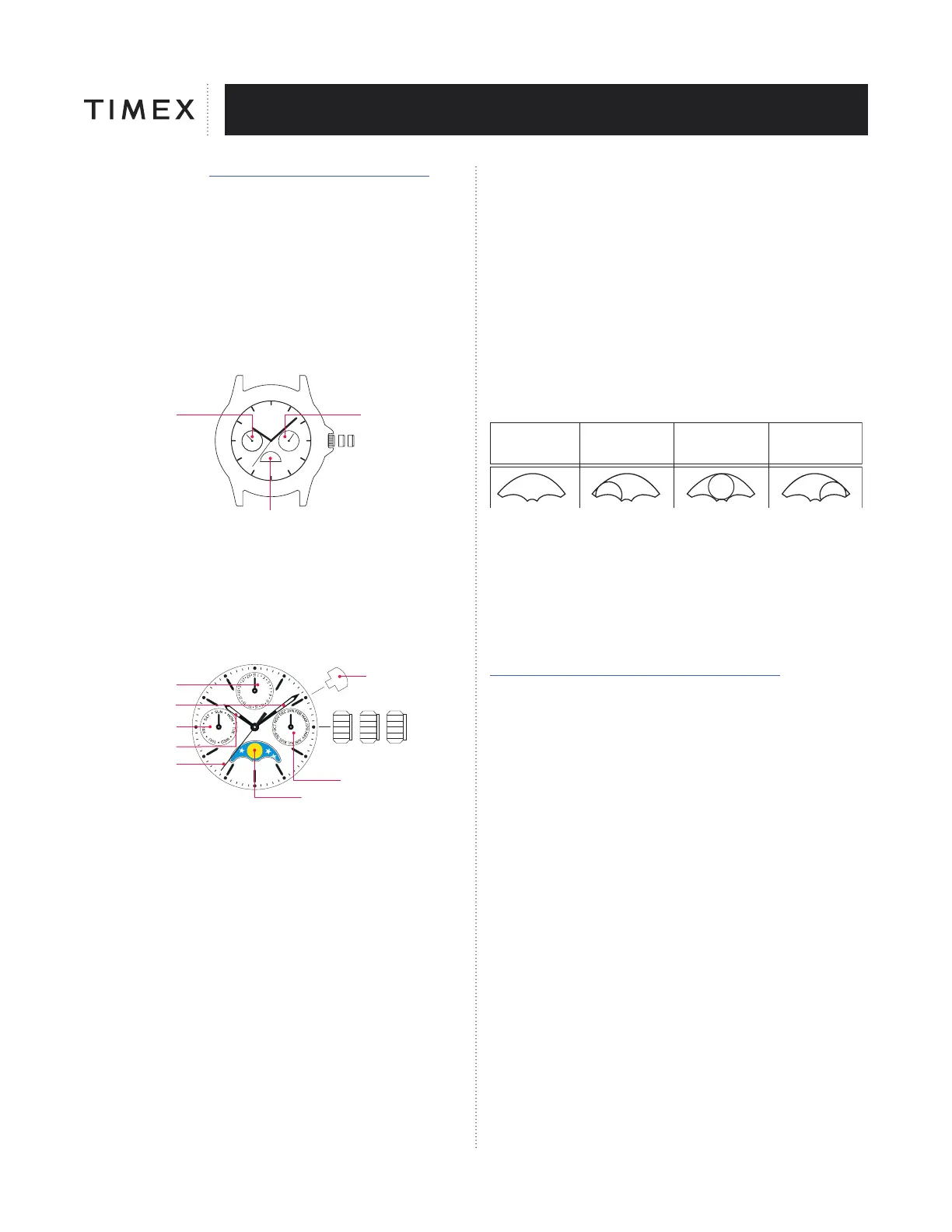
DAY/DATE/AM/PM/SUN/MOON MODELS
DAY
AM/PM
SUN/MOON
CROWN
POSITION
DATE
C
B
A
TO SET TIME:
1. PULL out crown to “C” position.
2. TURN crown clockwise to correct time. Day/am/pm/moon will also
change.
3. Push in crown to “A” position
NOTE: Remember to set time for am or pm (sun or moon.)
MOON PHASE MULTI-FUNCTION
CB A
CROWN
POSITION
PUSHER A
MONTH
MOON PHASE
AGE OF THE MOON
DATE
MINUTE HAND
DAY
(OF THE WEEK)
HOUR HAND
SECOND HAND
SETTING THE DAY OF THE WEEK AND
THE CURRENT TIME
1. When the second hand is at 12 o’clock, Pull the crown out to the position
“C”.
2. Turn the crown to advance the hour/minute hands in a clockwise direction
until the day sub-dial displays the current day of the week and the current
time is displayed correctly, including if it is AM or PM.
3. Push the crown in to position “A”.
NOTE: Do not set the day by moving the hands in a counterclockwise
direction. The day will advance somewhere between midnight and 6AM.
SETTING THE MONTH
NOTE: The month should be set first. If the watch is displaying the day of
the month from the 26th to the 31st, follow the instructions below to move
it out of this period. The month and date are synchronized such that when
adjusting the date at the end of short months (less than 31days), the month
automatically adjusts to the correct date. The month hand begins changing
to the next month around midnight of the 30th day. It completes the change
around midnight of the 31st. (On the 31st, the position of the month hand
is between the current and next month). The month and day will need to be
manually adjusted for Leap year.
1. Press pusher “A” fully to advance the hand.
2. Repeat until the hand is displaying the current month.
SETTING THE DAY OF THE MONTH
1. Pull the crown out to the position B.
2. Turn the crown counterclockwise to set the date quickly.
3. Push the crown in to position “A”.
NOTE: Do not set the date between the hours 9:00p.m. and Midnight as this
could prevent the date from properly changing on the next day.
SETTING AND READING THE PHASE OF THE MOON
NOTE: The moon phase display represents the age of the moon, use this
as a guide to the age and phase of the moon when viewing or setting this
function. The most accurate time to set this function is when there is a full
moon or a new moon. Locate a source of the age of the moon (0, 7, 15,
22) or the closest to these four ages. Using the images below, follow this
process to place the display in the corresponding image.
1. Pull the crown out to the position B.
2. Turn the crown to advance the moon display clockwise until the image
best matches the age of the moon.
3. Push the crown in to position “A”.
New moon
Moon’s age: 0
Spring tide
First quarter moon
Moon’s age: 7
Neap tide
Full moon
Moon’s age: 15
Spring tide
Last quarter moon
Moon’s age: 22
Neap tide
BATTERY
Timex strongly recommends that a retailer or jeweler replace battery.
If applicable, push reset button when replacing battery. Battery type
is indicated on caseback. Battery life esti-mates are based on certain
assumptions regarding usage; battery life may vary depending on actual
usage.
DO NOT DISPOSE OF BATTERY IN FIRE. DO NOT RECHARGE. KEEP
LOOSE BATTERIES AWAY FROM CHILDREN.
TIMEX INTERNATIONAL WARRANTY
To view or print our warranty, please click here
http://assets.timex.com/user_guides/warranty/Warranty.pdf
©2024 Timex Group USA, Inc. TIMEX
®
is a registered trademark of TIMEX
GROUP in the US and other countries.


 To Previous Page
 Loading...