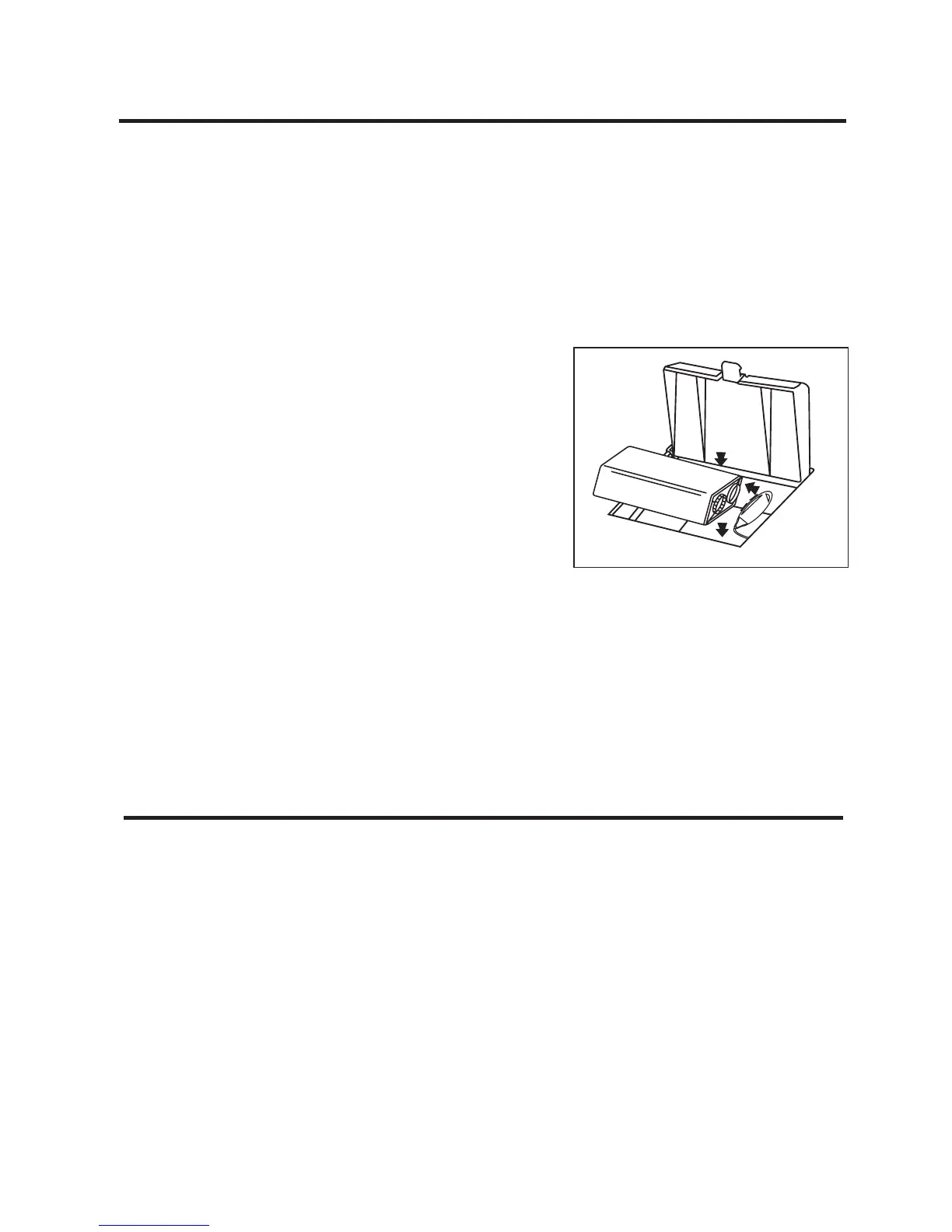
Battery Compartment
Battery Backup Installation
In the event that the AC power cord is disconnected or a power
failure or other interruption occurs, the Battery Backup will
maintain clock and alarm settings for the life of the battery. During
any interruptions the clock display will be blank, but time and
alarm settings will be saved and automatically restored when AC
power is again active.
To install the battery:
1. Open the battery compartment
cover.
2. Install one 9-Volt battery (alkaline
is recommended for longer life),
making sure that the large terminal
matches to the large outlet.
The Battery Backup Indicator LED is located in the lower-right-
hand corner of the display. The LED will light when no battery
is installed, or when the installed battery is low on power.
Note: You should replace the battery every six months, or after
any extended power outage that could drain the battery power.
Maintenance
• Protect your furniture when placing the unit on natural wood
or wood with a lacquered finish. A cloth or other protective
material should be placed between the unit and the furniture.
• Clean the casing with a soft cloth moistened only with mild
soap and water. Stronger cleaning agents, such as benzine,
thinner, or similar materials are not recommended, as they
may damage the surface of the case.
• If the unit is not to be used for a prolonged period, such as
a month or longer, remove the battery to prevent possible
corrosion. Should the battery compartment become corroded
or dirty, clean it thoroughly and replace the battery.



 To Next Page