5
Setting and Using Alarms
1
Press and hold the Alarm 1 Button until the current alarm time blinks on the display.
The Alarm 1 indicator will light.
2
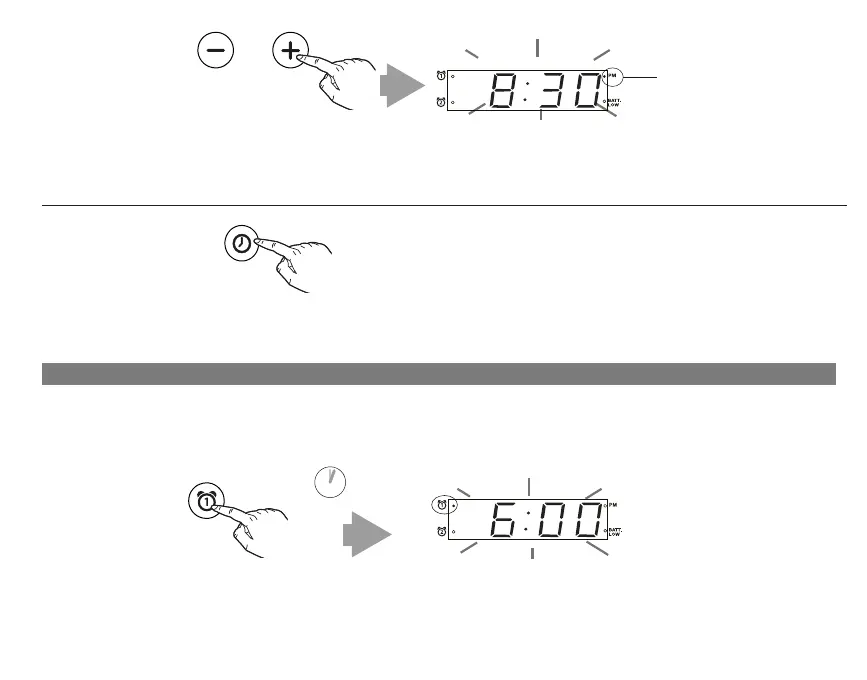
Press and release the MINUS or PLUS Buttons to adjust the time (press and hold for rapid setting).
NOTE: The PM indicator will light when the hour is set for PM. There is no AM indicator.
This unit has two independent alarms, Alarm 1 and Alarm 2. Each is set and operates in the same way. Instructions
below show Alarm 1. Follow the same method to set Alarm 2. Alarms sound for 1 hour.
PM indicator
2 SECS
Press and release the Clock/Alarm Reset Button to complete clock setting.
3
ALM RESET
OR



 To Next Page