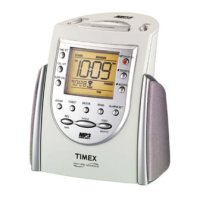
Setting the Clock Time
1. Slide the Setting switch to ‘Clock’.
2. Press the Hour button until the current hour is displayed. REMEMBER
to set the correct AM or PM. The PM indicator is located on the left
side of the display.
3. Press the Minute button until the correct time is displayed.
4. It is IMPORTANT to slide the Setting switch into the ‘Lock’ position
and always leave it there unless you are setting the clock or alarm time.
Setting the Alarm Time
1. Slide the Setting switch to ‘Alarm’.
2. Press the Hour button until the correct alarm hour is displayed.
REMEMBER to set the correct AM or PM. The PM indicator is located
on the left side of the display.
3. Press the Minute button until the correct alarm time is displayed.
4. It is IMPORTANT to slide the Setting switch into the ‘Lock’ position
and always leave it there unless you are setting the clock or alarm time.
“Wake to” Operation
1. Set the alarm time as indicated in Setting the Alarm Time.
2. Slide the Wake to switch to the alarm sound you wish to wake to.
3. Slide the Alarm On/Off switch to ON. The alarm icon (
) will
light up in the upper left corner of the display indicating that the alarm
function is ON. The alarm is now set to turn on automatically at the
time selected.
Turning Off the Alarm
1. After the alarm sounds, press the Alarm Reset button to turn off
the alarm. The alarm is now automatically set to turn on again at the
same time the following day.
2. If you do not wish for the alarm to turn on again the following day, slide
the Alarm On/Off switch to OFF.
3. If the alarm is not turned OFF after it sounds it will play for approximately
2 hours, then turn off automatically. This cycle will repeat every 24
hours unless the controls are changed.



 To Next Page