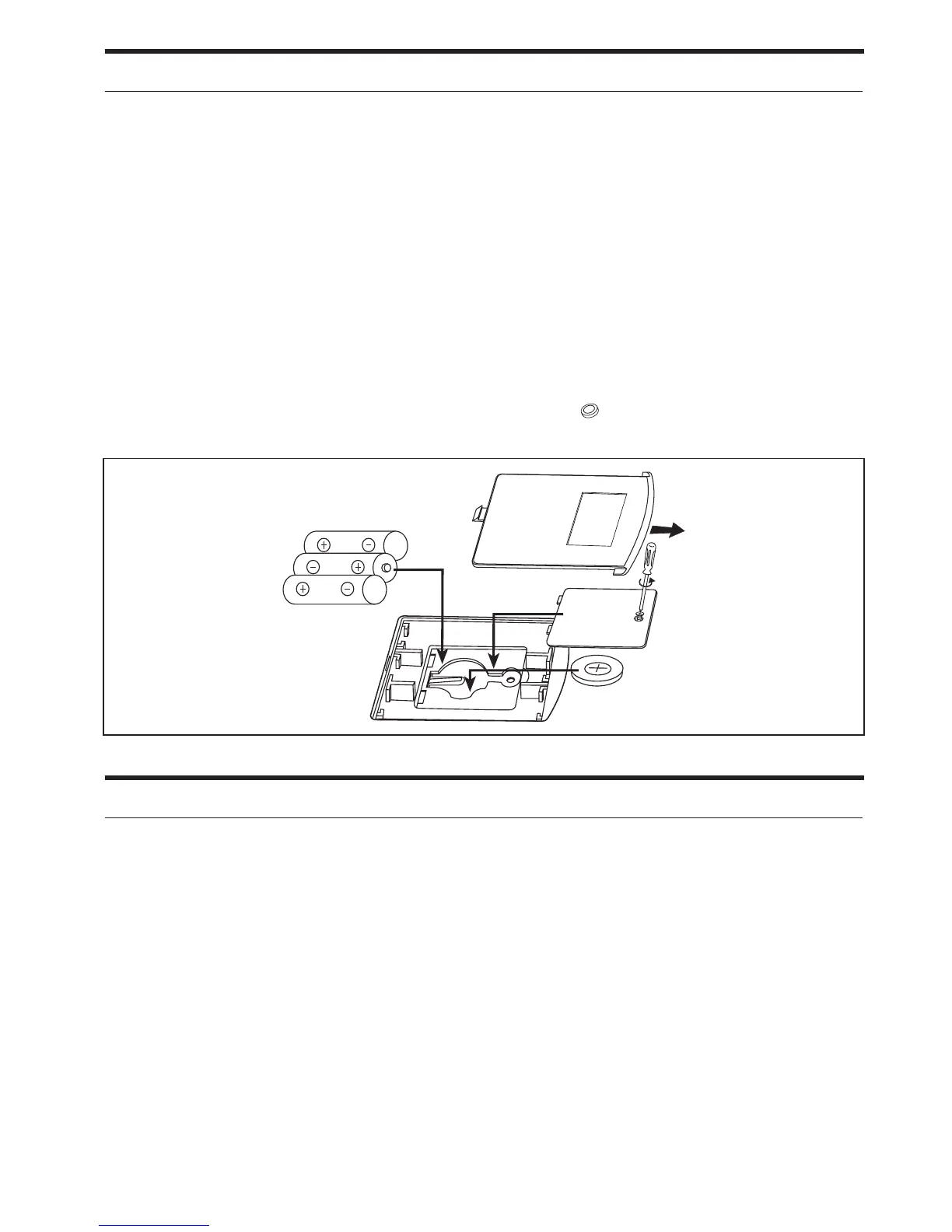
Lithium Battery Backup Installation
1. Gently turn the unit over and open the battery compartment door. If
necessary, remove the 3 “AA” batteries to get to the lithium battery
door.
2. Loosen the screw and remove the lithium battery door.
3. Replace the CR-2032 lithium battery, while making sure that the + and
– ends match up with the markings inside the battery compartment.
4. Place the door back on and tighten the screw, then reinstall the 3 “AA”
batteries and close the battery compartment door.
Note: This unit comes equipped with a CR-2032 lithium battery used for
battery backup purposes only. When the lithium battery is getting
weak the Lithium Battery Low Icon (
LOW
) will flash on the left side
of the display.
Battery Backup System
If the unit is being operated through AC power and there is a power
interruption, the 3 “AA” batteries will takeover and run the unit. All settings,
alarms, and instant weather will operate.
If the unit is operating through DC power (3 “AA” batteries) and there is a
power interruption, then the lithium battery (CR-2032) will maintain the time
and alarm time settings and operate the sure alarm. The sure alarm will
default all alarms to buzzer and turn on for 2 minutes.
All settings will be lost if there is a power failure and no batteries are installed.



 To Next Page