6. Presetting the Desk Starting Height
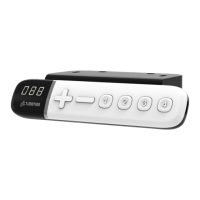
(1) Press - button until the desk reaches its lowest position and then release - button. Re-press - button
again for 5 seconds and the digital display will flash for 10 seconds.
(2) Adjust the starting height number with the + or - button.
(3) After 10 seconds, the display will stop flashing and this will confirm that you have successfully set the
starting height.
7. Restore Factory Setting
(1) Refer to Chapter 2-Reset: after the “beep” sound, press + and - buttons together for 15 seconds, the
control box will twice make a “beep” sound, and the digital display will show “---. “
(2) The settings below will restore to the original factory settings:
Memorized position
Desk starting height
Upper and lower height limit
T-touch or TCS1 sensitivity



 To Next Page