14
emax-usa.com
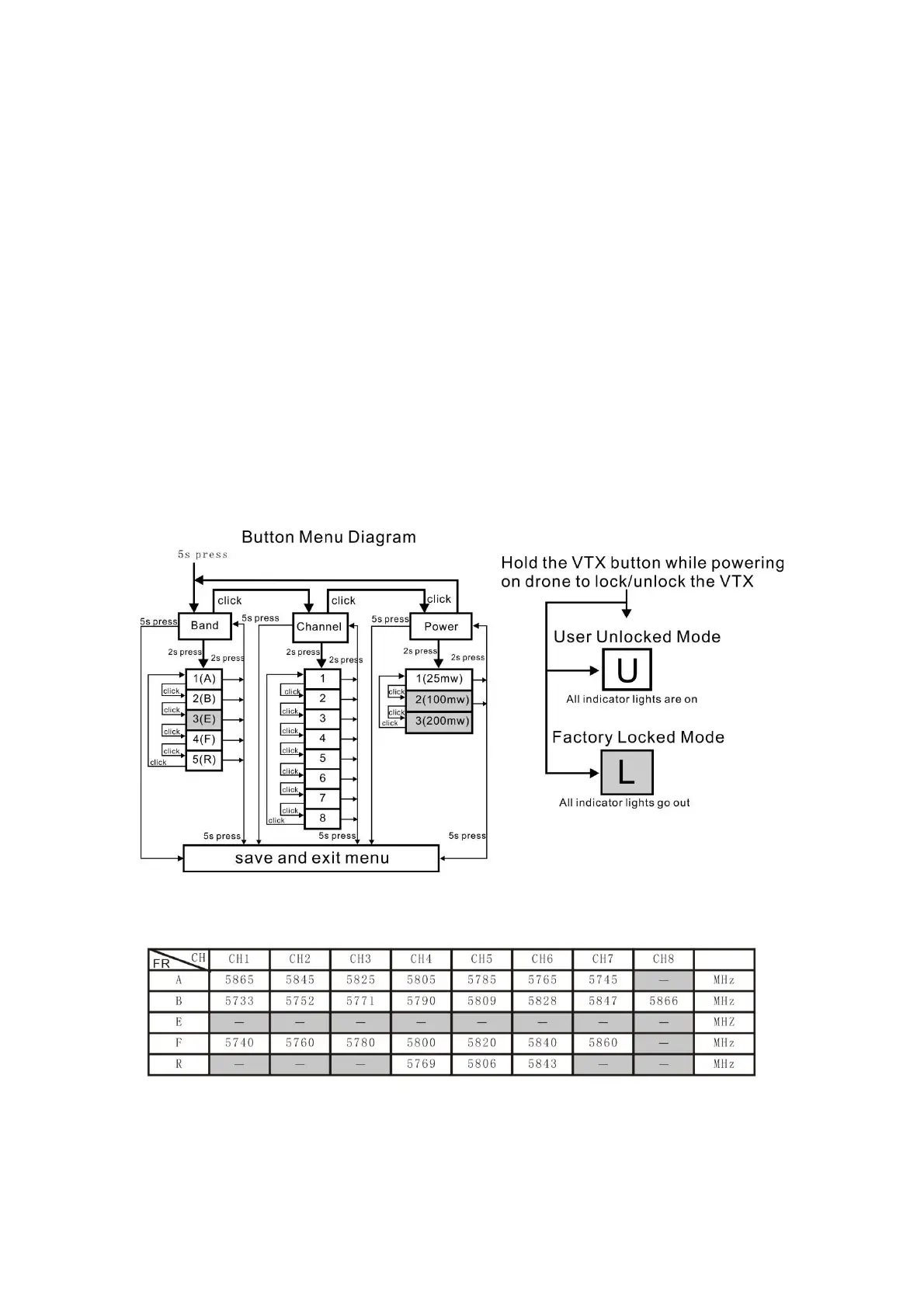
(2)Press the button and hold for 5s again to save parameters and exit the menu.
After saving and exiting the menu, all LED goes out.
3.Enter/Exit Band / Channel / Power option
(1) After entering menu, short click button to switch frequency group band /
frequency point / power, and the LED of the corresponding menu is lit.
(2) Press the button and hold for 2s to enter frequency group band / channel /
power option.
(3) Press the button and hold for 2s again to exit frequency group band / channel /
power option and return to the menu.
4. Band / Channel / Power parameter change
After entering frequency group band / channel / power option, short click button to
change the parameter.
Notice: If you change to an illegal channel using SmartAudio, there will be no image
transmitting from Tinyhawk II Freestyle. To switch back to a legal channel, press the
button on the vtx and follow the vtx menu guide shown below.
Factory Locked Configuration (≤ 25mW Output)
FCC: Ham radio license required for use in North America.
EU/CE: Frequencies limited to prevent transmitting outside of designated CE
frequencies.


 To Next Page