TTI932CHN
28
Getting
started...
EN
Battery pack
Attaching / releasing the battery pack
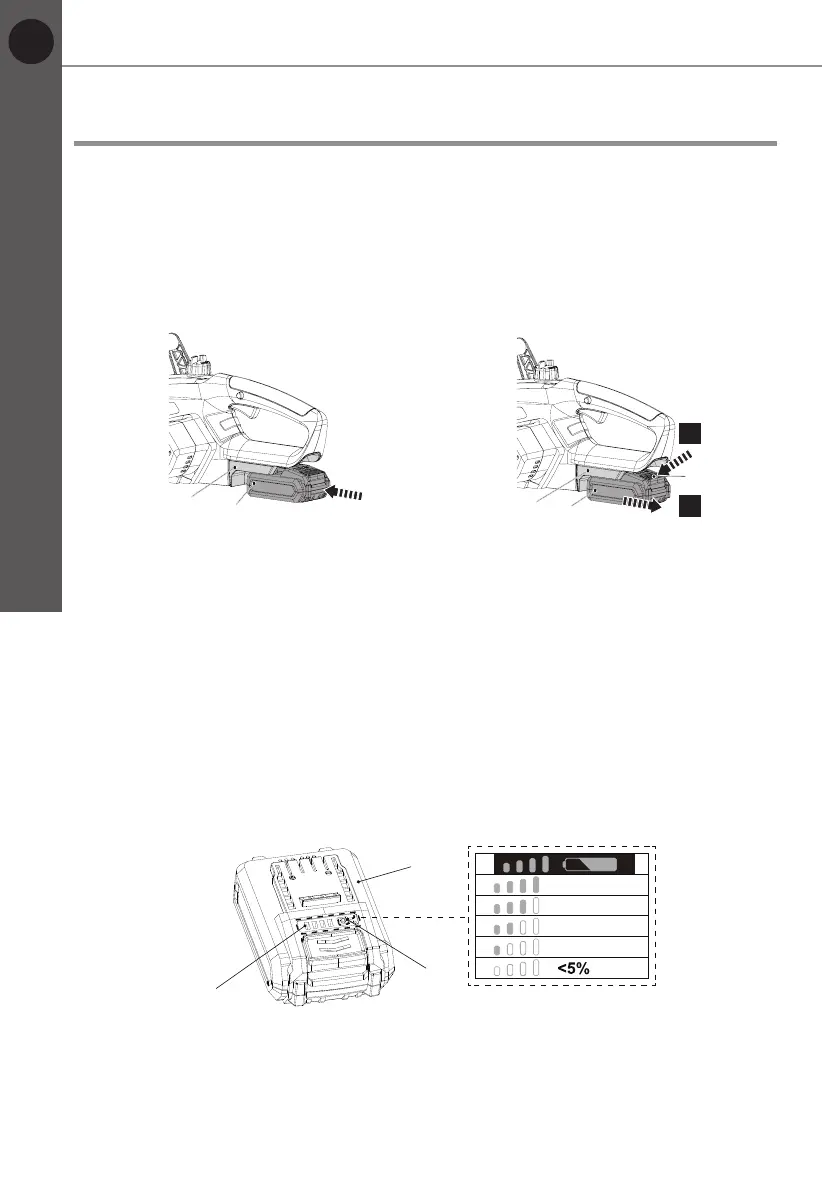
1. Align the battery pack (23) with the sliding slots of the battery docking port
(19) and slide the battery pack (23) in to attach it. Ensure it clicks in place
(Fig. 13).
2. Press the release button (23b) and remove the battery pack (23) from the
battery docking port (19) (Fig. 14).
19
1.
2.
Fig. 13 Fig.14
Charging the battery pack
The battery pack (23) for this product has been shipped in a low charge
condition. Charge it fully before rst use.
Refer to the charger’s instruction manual (MFC18) for the details.
Battery capacity indicators
The battery pack (23) is equipped with the battery capacity indicators (23c)
which are used to give an indication of the battery pack’s remaining capacity.
Press the battery capacity button (23a) to check battery capacity (Fig. 15). The
LEDs will stay lit for approximately 5 seconds.
23c
23a
23
76~100%
51~75%
26~50%
5~25%
Fig. 15
Before you start



 To Next Page