9
IOM - ALPHA CONTROLLER
Redefine your comfort zone. ™ | www.titus-hvac.com
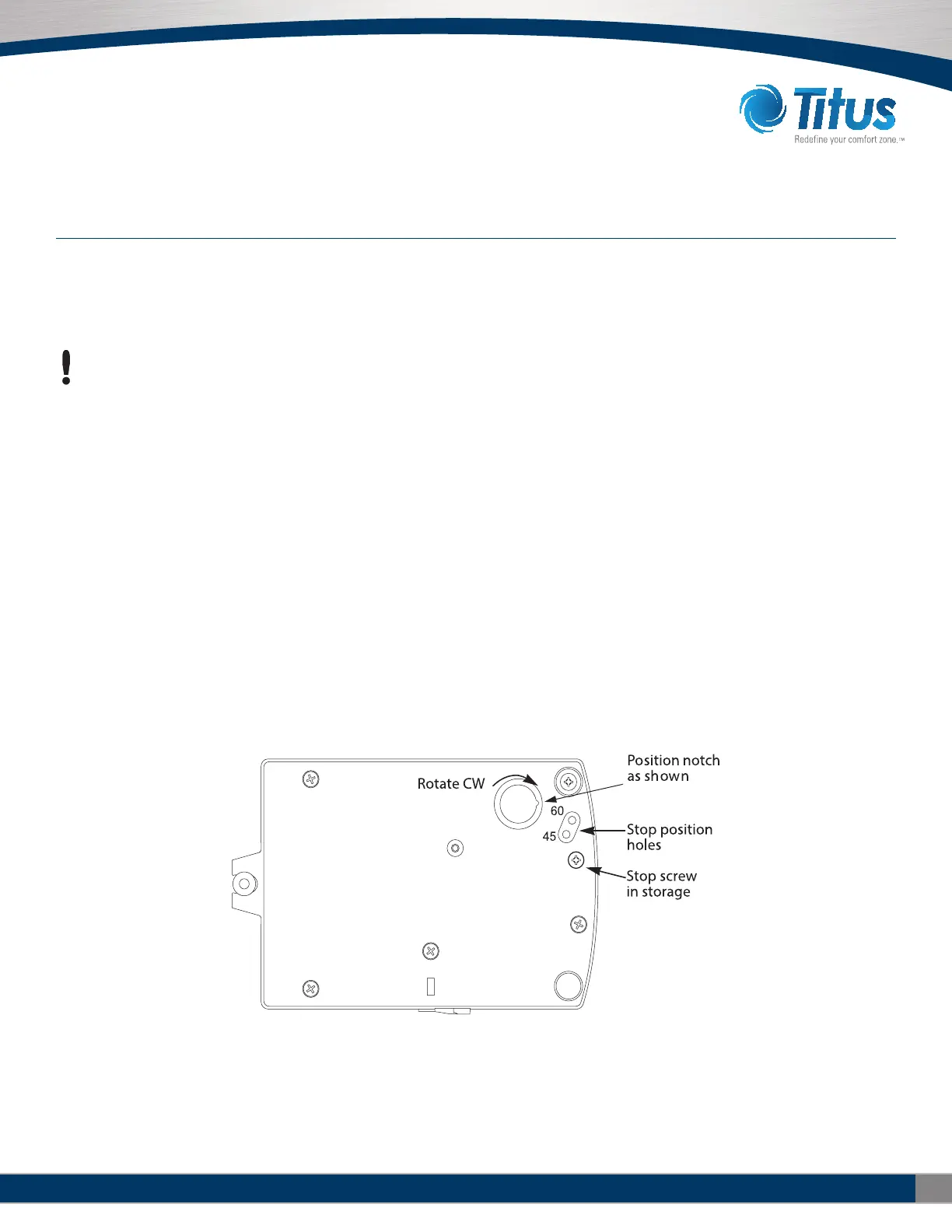
Before mounting the controller, set the rotation limits with the supplied
stop screw. Installing the stop screw limits the shaft rotation to either 45
or 60 degrees.
CAUTION
Before setting the rotation limits on the controller, refer to the damper
position specifications in the VAV control box to which the controller
will be attached. Setting rotation limits that do not match the VAV
damper may result in improper operation or equipment damage.
To set the rotational limits:
1. Turn the controller over so you have access to the back.
2. Manually rotate the actuator fully clockwise as viewed from the back.
3. Remove the stop screw from its storage location and clean any debris
from the threads.
4. Insert the screw into the correct stop position hole.
5. Tighten the screw only until the head touches the plastic in the
bottom of the recess.
Section 2 — Installing the Controller
SETTING THE ROTATION LIMITS
Illustration 2-1 Controller stop selections


 To Next Page