Finding Programs
20
2
4. Press SELECT to see the list of programs without leaving the channel selector, or press the
RIGHT arrow to see the list of programs and move to the list.
5. When you find a program you want to record, highlight it and press SELECT.
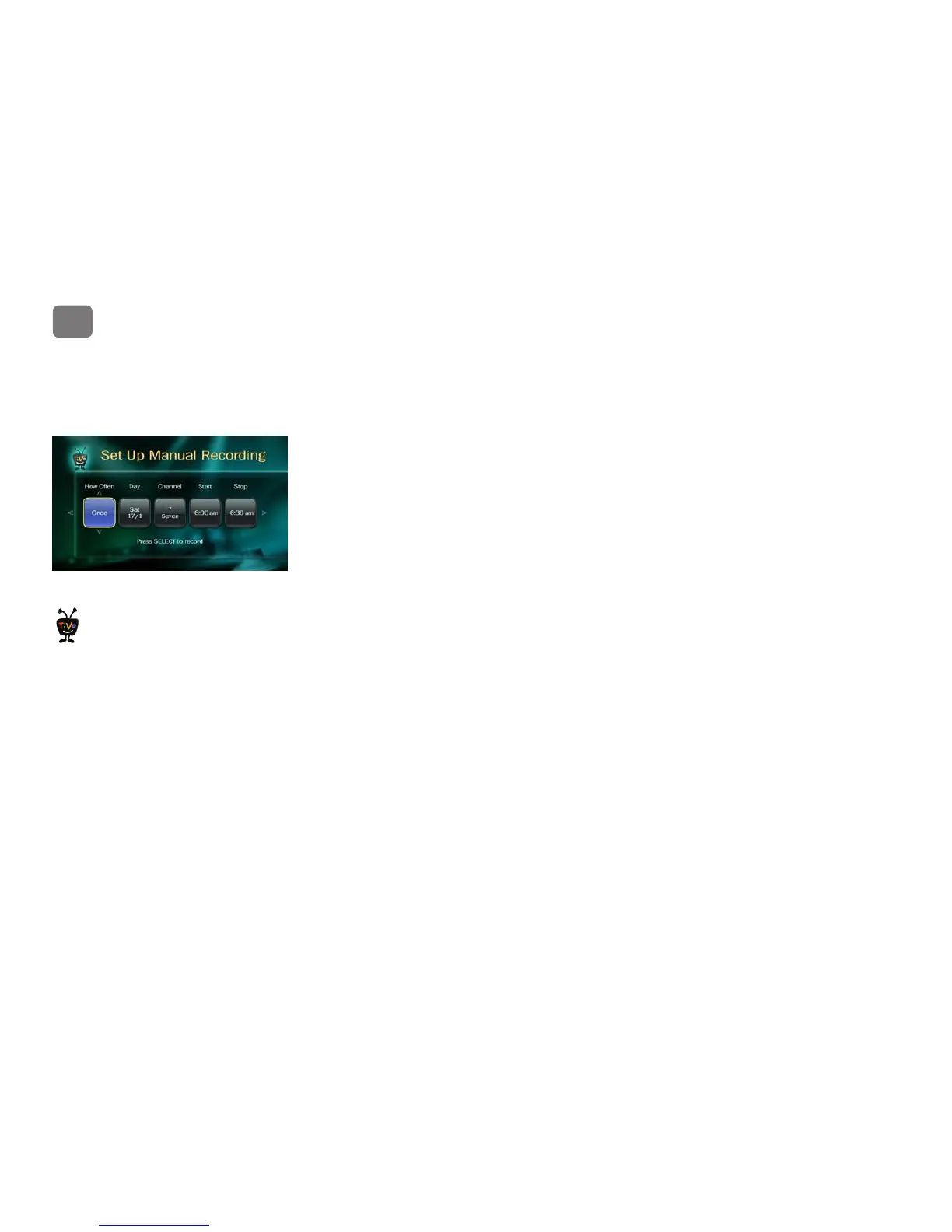
Set Up Manual Recording. Schedule a recording on a specific channel at a specific time. To
create a manual recording:
1. Choose the recording type, using the UP/DOWN arrows to select whether the recording will
be One Time or Repeating, then press the RIGHT arrow.
2. Choose the day(s) for the recording, using the UP/DOWN arrows to change the current
selection. If you chose Repeating, you can choose to repeat the recording on a specified day
of the week (Every Tuesday) or several times a week (Every M - F).
3. Press the RIGHT arrow and choose a channel using the UP/DOWN arrows (or by entering a
number with the remote, then pressing ENTER).
4. Press the RIGHT arrow and set the hour, minute, and am/pm for the start and stop time,
using the UP/DOWN arrows to change the current selection. Press the RIGHT arrow or
SELECT.
5. You’ll see a confirmation screen. The TiVo media device shows a “best guess” program title
based on guide listings for that time and channel. Select Record This Showing.
Use a repeating manual recording to
record things like just the opening
monologue of a late night talk show.
®



 To Next Page