Need help?
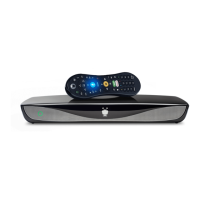
Do you have a question about the TiVo Roamio OTA and is the answer not in the manual?
Instructions to activate the TiVo service before connecting the box.
Guides users through the on-screen setup for personalization.
Explains the TiVo Central screen as the main hub and its components.
Warns against object entry, liquid spills, and damage requiring service.
Explains the TiVo Central screen as the starting point and its components.
Explains how OnePass gathers all series episodes for instant viewing.
Explains how to use the SkipMode feature to skip commercials.
Explains how to use QuickMode for faster playback with audio.
Explains how to watch and navigate live TV broadcasts.
Explains how to use the program guide and mini-guide to find shows.
Explains how to search for shows by title, person, or keywords.
How to manually schedule recordings by time and channel.
How to create and manage WishList searches for shows.
How to manage recordings and OnePass searches via To Do List and OnePass Manager.
How to set default and specific options for OnePass and recordings.
Explains how to use the status bar to navigate live TV and recordings.
How to view and use the info banner for show details and shortcuts.
Connect to TiVo service via wired or wireless networks.
Set limits on shows, lock channels, and prevent unauthorized viewing.
Options to restart the TiVo box, repeat guided setup, or reset to factory settings.
Troubleshooting steps for not seeing the Welcome screen on initial setup.
Addresses issues related to TiVo service dependency and data collection.
Covers reading, retaining, heeding warnings, and following all instructions.
Warning about battery replacement and disposal.
 General
| Tuner Count | 4 |
|---|---|
| Storage Capacity | 500 GB |
| Resolution | 1080p |
| Connectivity | Ethernet, Wi-Fi |
| Category | DVR |
| Tuner Type | ATSC |
| Output Resolution | Up to 1080p |
| USB Ports | 2 |
| HDMI Output | 1 |
| Component Video Output | 1 |
| Composite Video Output | 1 |
| Optical Audio Output | 1 |
| Streaming Services | Netflix, Hulu, Amazon Prime Video, YouTube |
| Remote | RF |
| Outputs | HDMI, Component, Composite, Optical Audio |
| Remote Type | RF |
| Recording Time | 150 HD hours |

 To Next Page