Hardware Version : 5.02 Document Version : 0
TECHMAN ROBOT INC. 5F., No. 58-2, Huaya 2nd Rd., Guishan Dist., Taoyuan City, 333411 , Taiwan
Techman Confidential 38
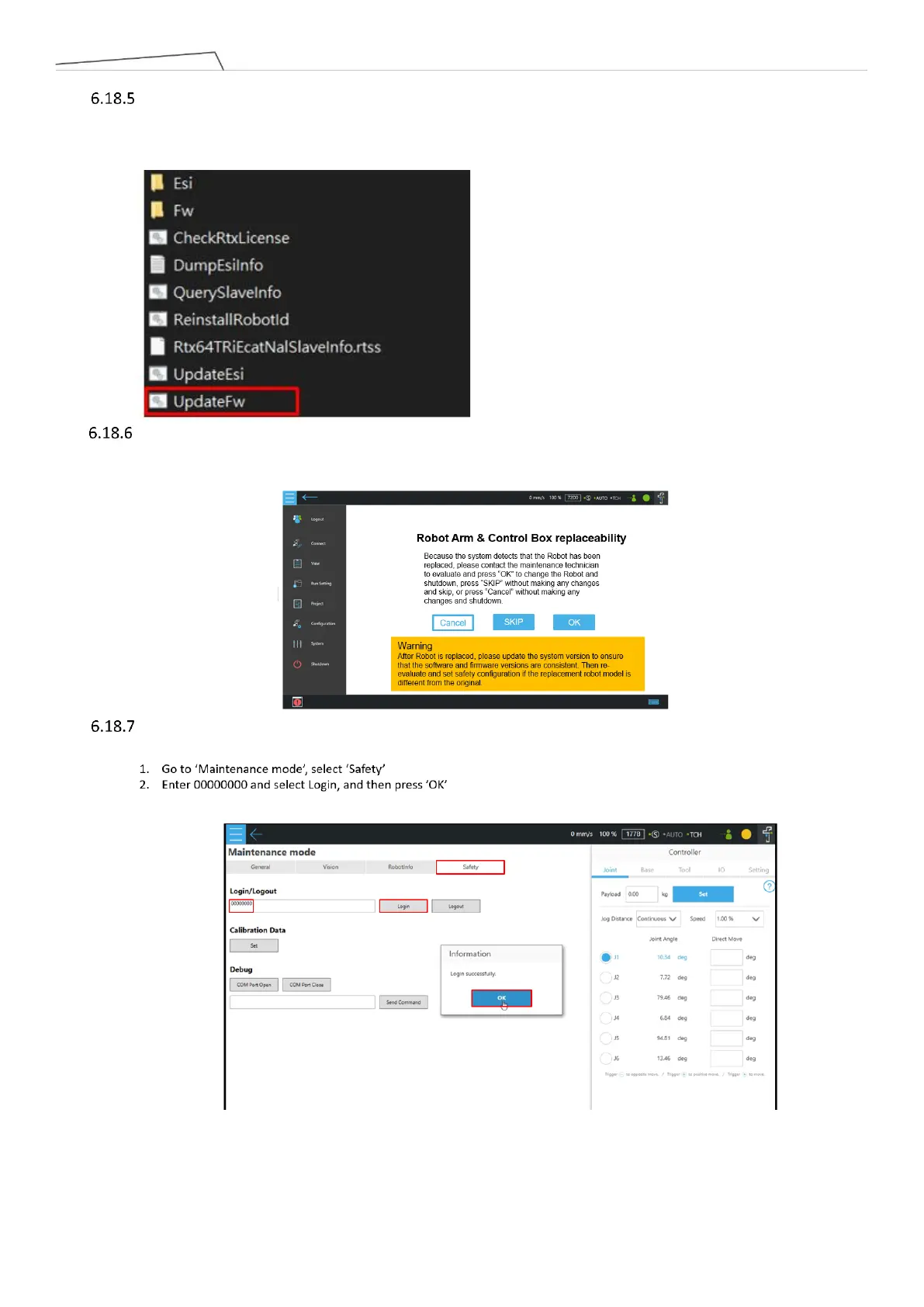
UpdateFW: After entering Windows, execute the file "UpdateFW" in the path "D:\Techman Robot\TM
Flow\ModuleRelease". After completion, it is necessary to completely turn off the power to the control box
and the robot before restarting. It is recommended to unplug the external power cord after shutdown and
then reconnect it before turning the power back on, ensuring a complete power shutdown.
After replacing new joints and the Patriot power board, the robot may display the following screen during
boot-up. This indicates that the joint serial number has changed. Select "OK" and enter the default password
"00000000". The robot will then shut down and reboot automatically.
When replacing a new end module or its PCBA, user needs to go to maintenance mode and perform the
following steps:



 To Next Page