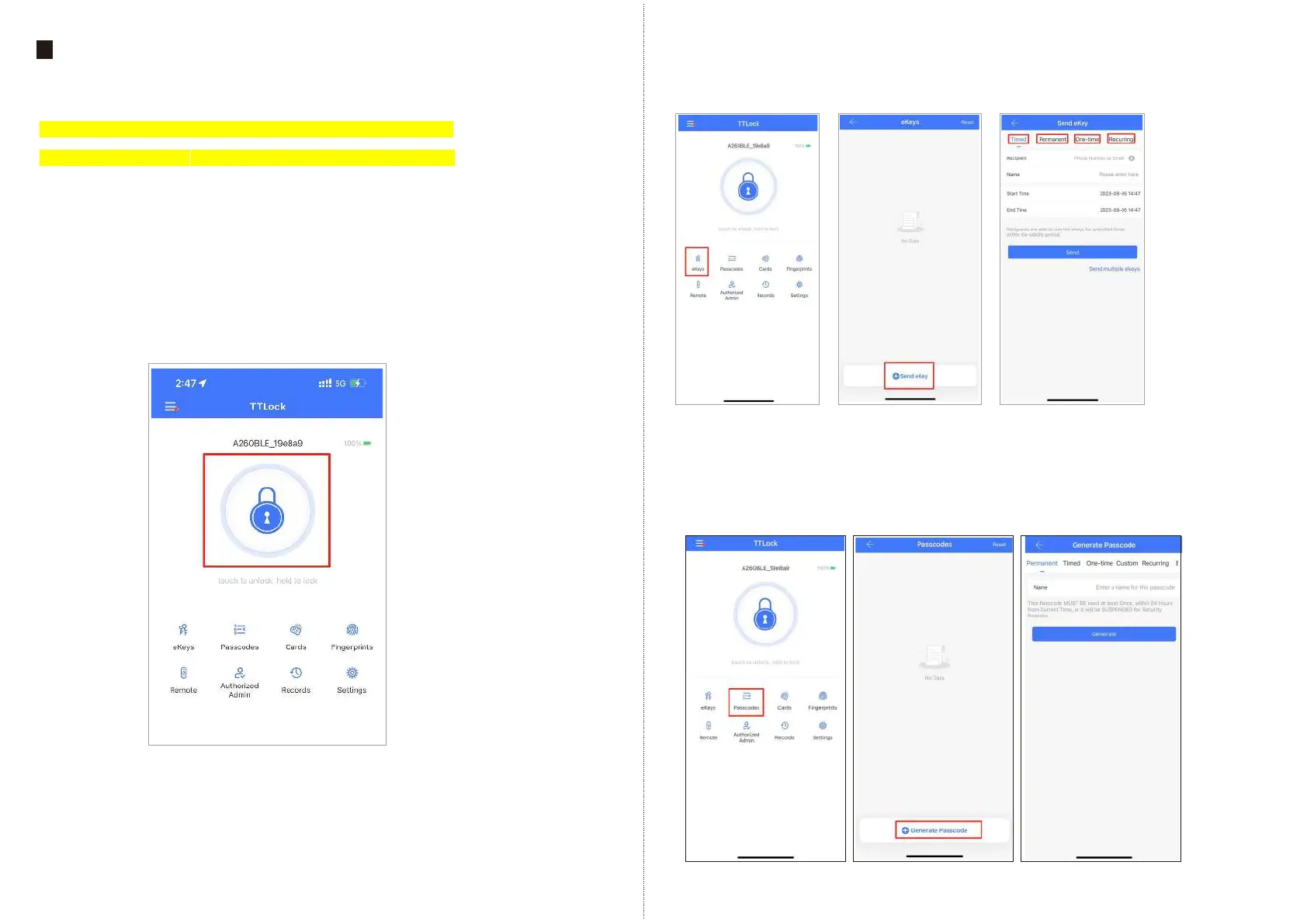
2. Lock /Unlock
Press for unlock, long press for lock. It requires your smart phone
and bluetooth lock to be within a certain range.
Note: If you want remote control, you need to connect to the
Gateway (not included in the package, purchased separately).
3. Send ekey
You can add another account on the app.
This way your family can also control the Bluetooth lock via the app. Support
authorized users to Limited time, Permanent, One-time.
Recurring control smart lock.
4. Generate Passcode
Generate or customize the passcode of the Bluetooth lock. Generate or customize
permanent one-time, time-limited, recurring passcode.
Note: Generate the passcode to clear the passcode that Bluetooth lock stored by
“Erase”. Once used, in addition to the admin passcode, other passcode will
be cleared.
EN - 9 support@tmezon.comEN - 10 support@tmezon.com
TTLock APP Operation
9
1. Account information Change
1.1 When logging in “TTLock” App, you need set up an account and account password.
Each account can be added with multiple smart device locks for management.
Once the smart lock is added, it will become the admin account for the lock.



 To Next Page