5.1 LED Indications
5.2 Photocell logic
5.3 Deceleration function
5). FUNCTIONS
LED1: Power indicator. LED is blinking indicates there is power supply.
LED2: LED2 is ON indicates the sliding motor meets the OPEN LIMIT.
LED3: LED3 is ON indicates the sliding motor meets the CLOSE LIMIT.
LED4: Remote and System learning indicators
LED5: Blinking while opening
LED6: Blinking while closing
The 5% of the final stroke is the deceleration zone. The gate moves with 20% full speed till closed or limit switch is
triggered.
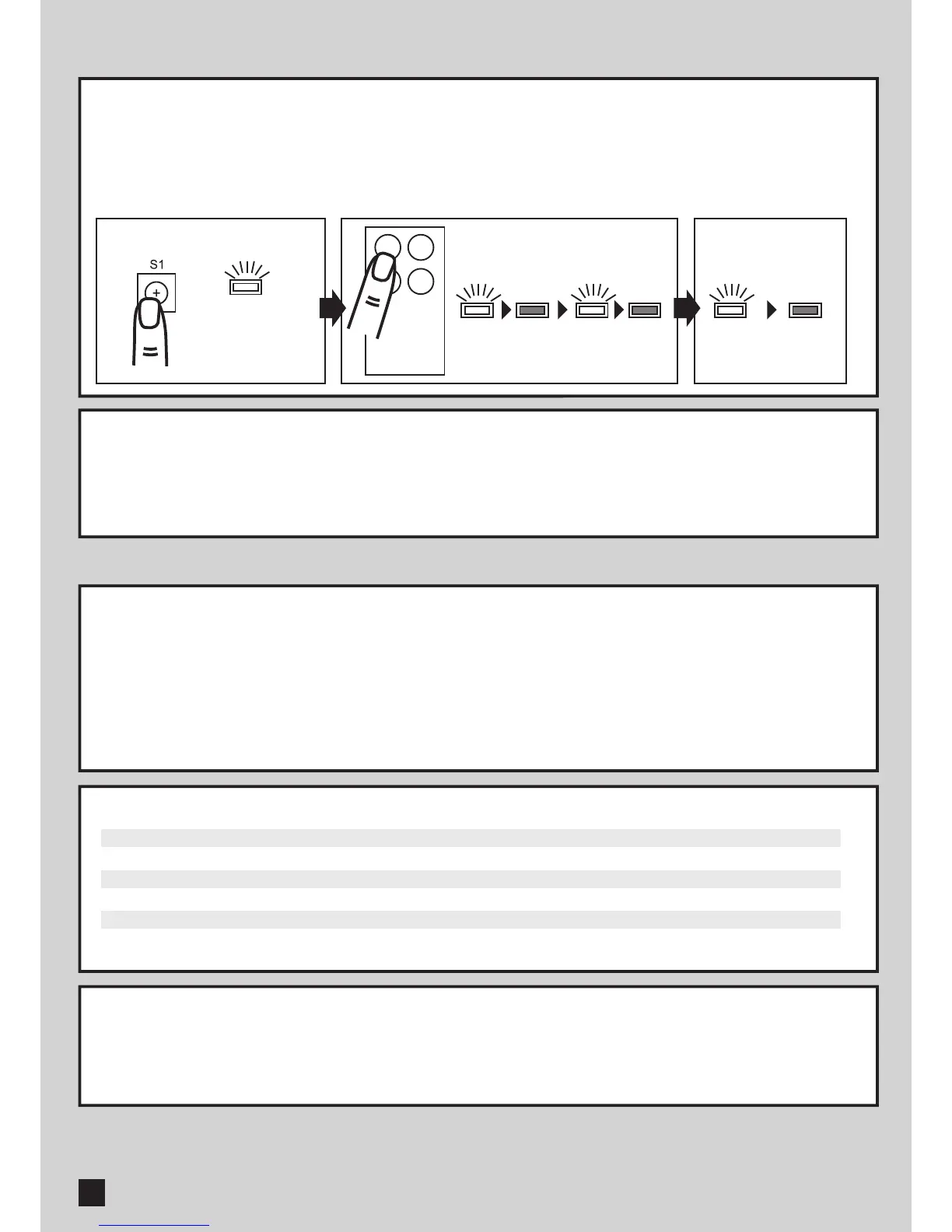
LED 4 blinks twice
LED 4 OFF
LED 4 ON
2 Sec
RF-Learn
Position of Gate
Gate closed
Gate Opened
Stop in the middle
Gate closing
Gate Opening
Photocell activated
No action
Stop moving, waiting for further indications. If auto-closing function is ON, start auto-closing after 20 seconds
Stop moving, waiting for further indications. If auto-closing function is ON, start auto-closing after 20 seconds
Gate stops and reverses to opened
Door stops. If auto-closing function is ON, start auto-closing after 20 seconds
4.1 Remote setting
4.2 System learning
4). REMOTE SETTING AND SYSTEM LEARNING
a. Remote learning: Press S1 3 seconds to enter remote learning mode and LED4 is on. Press A button on the
remote in 10 seconds and LED4 blinks twice. After LED4 goes off, remote learning completed.
b. Clean the remote memories: Press S1 for 10 seconds. After 10 seconds, LED4 will blink 4 times and the remote
memories are removed.
After remote learning, press A button to start system learning. The gate closes 10 seconds with full speed and
move with decelerated speed till limit-switch triggered.
HUSKY SERIES SLIDING GATE OPENER USER MANUAL
8
A B



 To Next Page