7. CONNECTIONS
7.1. Input Connections
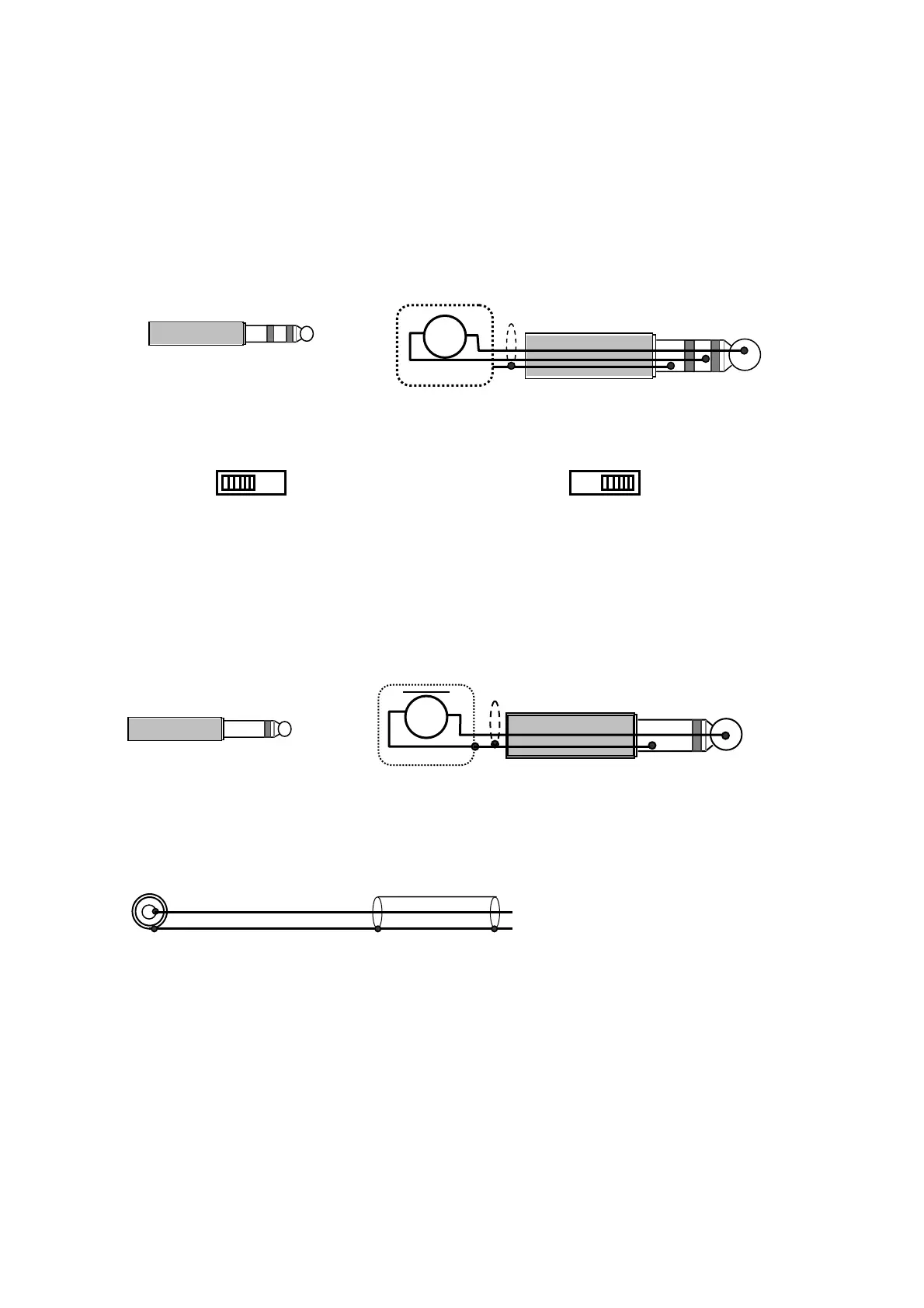
● Mic1, Mic2, Mic3 Connection (Phone Plug)
Because MIC input is electronically balanced type, it uses double pole phone plug.
MIC
Two Core Shielded Cable
MIC
Double Pole Plug
To Micic
Phantom Switch Position
In the case of Dynamic Microphone In the case of Phantom Power Microphone
PHANTOM
PHANTOM
ON
OFF ON
OFF
However, the microphone input circuit is in a condition of unbalance when it uses Single pole type.
Because it is easy to pick up noise with the state of unbalance, the length of the microphone cable
recommends what is used at less than 10m.
One Core Shielded
MIC
MIC
Single Pole Phone Plug
To Mic
● AUX input Connections (RCA pin jack)
Signal source (Tuner, Cassette Tape, etc)
One Core Shielded
8



 To Next Page