gf11
Congure TOA IP Audio Systems for the CyberGate serviceCyberTwice
11
Conguring a TOA IP Paging Gateway
The TOA IP Paging Gateway can broadcast audio from Microsoft Teams to different TOA IP Paging
devices using Multicast.
Each TOA IP Paging device has its own Multicast address. During the Teams call you can select the
desired TOA Paging Device using DTMF keys in Teams.
First step is to congure the different devices in your TOA IP Paging Gateway.
Register the TOA IP Paging Gateway the same way as described in the rst section of this manual.
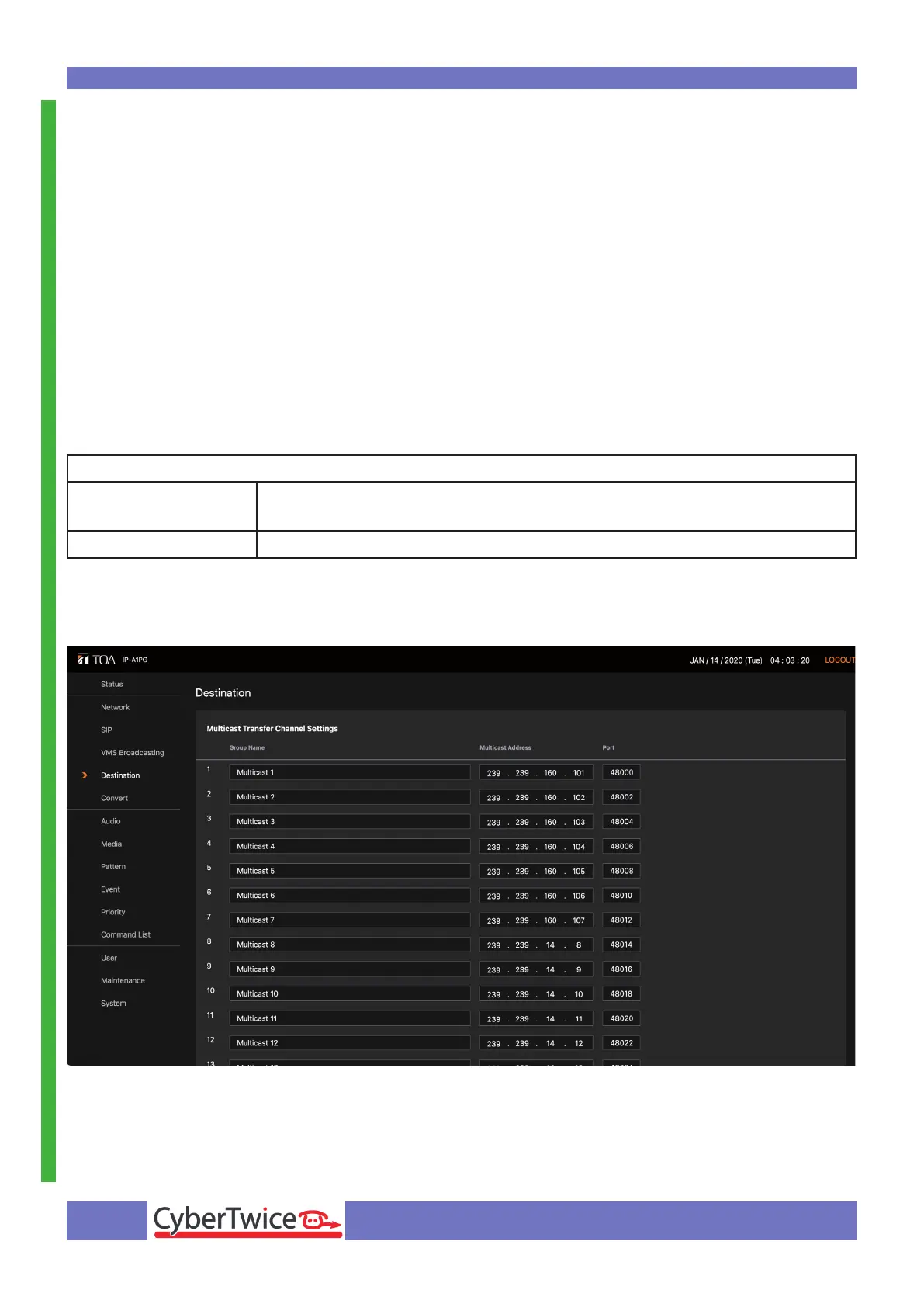
After that, navigate to the Destination menu.
Modify the following information:
Destination
Group Name Provide a name for the Multicast group (in this example the names re-
mained default ‘Multicast 1, Multicast 2 etc)
Multicast Address Provide the correct Multicast address for this Multicast group *
* Each IP Paging Device has its own Multicast address. To address a specic IP Paging Device, use
its Multicast address in this overview.
Click the orange Save button when done.



 To Next Page