Home
Tobii Pro
GPS
Fusion
Page 12 (Using the USB Type-A to Type-C Adapter)
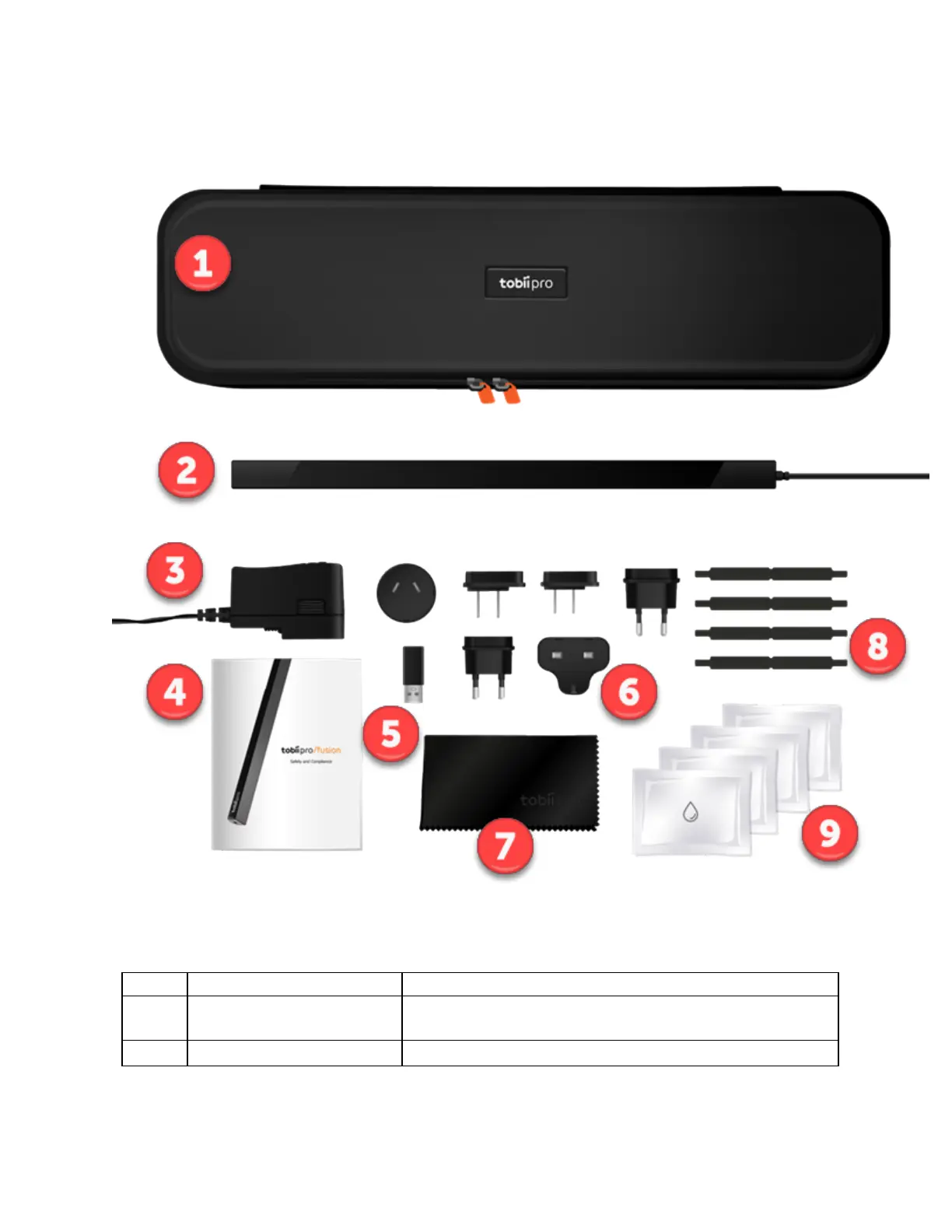
Tobii Pro Fusion - Using the USB Type-A to Type-C Adapter; Attaching the Adapter Plug; Removing the Adapter Plug; Tobii Pro Accessories
37 pages
Manual
Save Page as PDF
To Next Page
To Next Page
To Previous Page
To Previous Page
Loading...
Pro
Fus
i
on
Us
er
Man
ual
v.2
.2
12
4
.
4
Wh
a
t
’s
in
t
h
e
P
ro
F
u
s
io
n
b
o
x
#
Item
Addi
ti
onal
i
nform
ati
on
1
Trave
l
cas
e
S
tore
s
,
protec
ts
,
and
c
arrie
s
P
ro
Fus
i
on
and
the
in
c
l
ude
d
ac
c
es
sori
es
2
Pr
o
Fus
i
on
ey
e
trac
k
er
U
s
ed
for
eye
track
ing
11
13
Table of Contents
Main Page
Table of Contents
3
Introduction
5
Symbols Used in this Document
5
Tobii Pro Eye Tracker Manager
5
System Requirements
7
Pro Fusion System Requirements
7
Additional Software Options
7
Safety
8
Mounting Warning
8
Emergency Warning
8
Epilepsy Warning
8
Infrared Warning
8
Magnetic Field Warning
9
Child Safety
9
Electricity
9
Accessories
9
Third Party
9
Power Supply
9
Overview of Tobii Pro Fusion
10
Product Versions
10
Key Features
11
How Tobii Pro Fusion Works
11
What's in the Pro Fusion Box
12
USB and Power Adapter
13
How to Use the USB Type-A to Type-C Adapter
14
Attach the Adapter Plug
15
Remove the Adapter Plug from the AC Power Adapter
15
Tobii Pro Accessories
16
Additional Software Options
16
Set up Your Tobii Pro Eye Tracker
17
Download and Install Tobii Pro Eye Tracker Manager
17
Install Pro Fusion in Tobii Pro Eye Tracker Manager
17
Mount the Eye Tracker on a Laptop or Monitor
17
Display Setup in Tobii Pro Eye Tracker Manager
20
Calibration
20
What Calibration Does
21
Detach the Eye Tracker
21
Change Pro Fusion's Frequency
22
Display Setups
23
Standard Setup
23
Advanced Setup
23
Setup with Tobii Pro Tripod Stand
23
Start Experimenting
25
Start Eye Tracking
25
Tobii Pro Lab
25
Keeping Your Eye Tracker Software and Display Setup Updated
25
Customer Support
26
Product Care
27
Operational Environment
27
Transportation and Storage
27
Cleaning
27
Disposal of the Eye Tracker
27
Limitation of Liability
27
Technical Specifications
28
Eye Tracking Specifications
28
Setup
29
Software Compatibility
29
Hardware Versions
29
Pro Fusion Eye Tracker Specifications
29
Compliance Information
31
CE Compliance
31
VCCI Compliance
31
General Compliance
31
FCC Interference Statement
31
Industry Canada Statement
31
CE Statement
31
Safety Compliance
31
EMC Compliance
32
Appendix A Support, Learning Center, and Warranty
33
A1 Customersupport
33
A1.1 Get Help Online
33
A2 Learning Center
33
A3 Warranty Information
33
Appendix B Limitations and Considerations
34
B1 Intended Use
34
B2 Light Conditions
34
B3 Eyelashes
34
B4 Droopy Eyelids
34
Appendix C Glossary
35


 To Next Page