3.4.3. Stunts
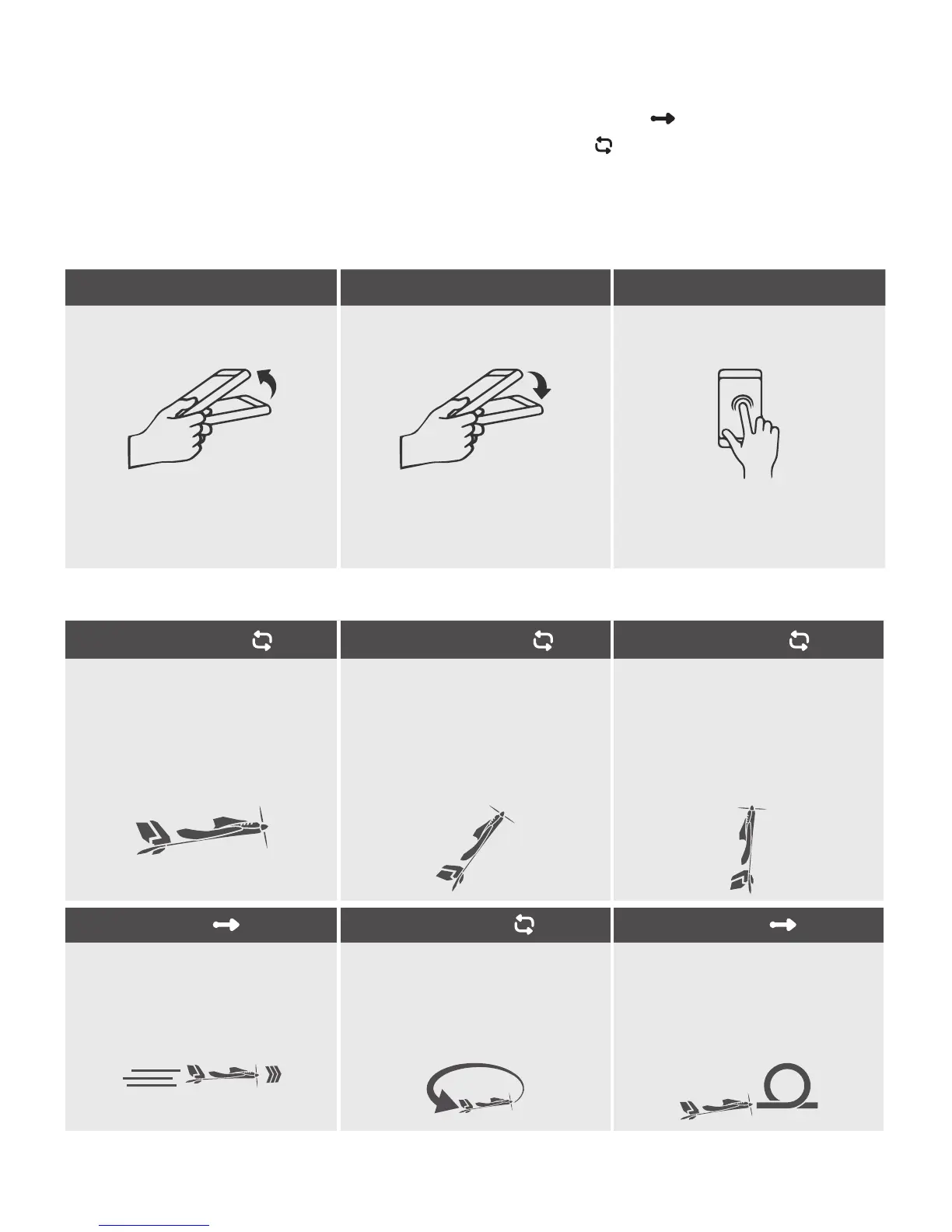
Through the use of control gestures, you can have your SmartPlane Pro
FPV
run various stunts and aerobatic
maneuvers. Part of the aerobatic maneuvers ends automatically after activation
. Other aerobatic maneuvers,
on the other hand, must be terminated by repeating the control gesture
. Under settings › Stunt-Editor you can
assign an aerobatic maneuver to each gesture. The SmartPlane Pro App is available at the time of launch with the
following control gestures and aerobatic maneuvers (TobyRich is constantly working on further stunts):
control gestures
Upick Downick Double Tap
Flick the smartphone abruptly
toward your body
Move the smartphone abruptly
toward the ground
Touch the screen twice in rapid
succession
Standard setting:
Change between
Helicopter and Hover Mode
Standard setting:
Boost
Standard setting:
Change between
Airplane and Helicopter Mode
aerobatic maneuvers
Airplane Mode
Helicopter Mode Hover Mode
The SmartPlane Pro
FPV
ies forward
horizontally with normal speed.
This mode is recommended for
the outdoor ight.
The SmartPlane Pro
FPV
ies
forward horizontally with normal
speed at a 45 ° angle. This mode
is recommended for the indoor
ight.
The SmartPlane Pro
FPV
ies vertically
on the spot and rotates around its
own axis.
Boost Circle Mode
Looping
The SmartPlane Pro
FPV
gets a
speed boost for a couple of
seconds. This is e.g. useful to y
against the wind.
The SmartPlane Pro
FPV
ies circles
autonomously.
The SmartPlane Pro
FPV
makes a
Looping.
IMPORTANT: Fly at a sufcient
altitude!


 To Next Page