Need help?
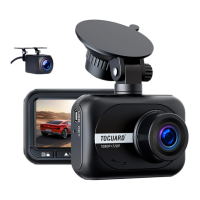
Do you have a question about the Toguard CE18A and is the answer not in the manual?
Automatic recording upon power on; indicates recording status with a red dot.
Allows the camera to capture HD photos up to 12 megapixels.
Enables viewing recorded videos and photos stored on the device.
Configure resolution, loop recording, WDR, motion detection, audio, date stamp, G-sensor, parking monitor, and car number.
Configures photo resolution, anti-shake stabilization, and date/time stamps.
Manages recorded files via delete, protection, and slideshow functions.
Configure screen saver, power, frequency, sound, language, date/time, format, and version.
 General
| Image Sensor | High Resolution CMOS Sensor |
|---|---|
| Lens | 170° High-Resolution Wide Angle Lens |
| Photo Resolution | 12MP / 10MP / 8MP / 5MP /3MP/2MP/ 1.3MP/VGA |
| WDR | Supported |
| Screen | 2.45 inch LCD Display |
| Video Resolution | 19201080P+1280720P/ 1280720P+1280+720P/ 640480P+640*480P |
| Video Format | MOV |
| Video Coding | H.264 |
| Picture Format | JPG |
| Loop Recording | Supported |
| Power on recording | Supported |
| G-Sensor Lock | Supported |
| Language | Chinese/English/Japanese/Deutsh/ French/Italian/Spanish |
| Operating System | Windows 7/10 or MAC |
| Audio Recording | Built-in microphone, On / Off optional |
| Storage | Micro SD Card (up to 32GB) |
| USB interface | Mini USB |
| Internal Power | Built-in Li-ion Battery |
| External power supply | DC 5V / 1.5A |

 To Next Page