EN - 16
Place nothing on top of the appliance. Do not cover air inlet or outlet openings. Covered air openings will disrupt the air
circulaon and will have a negave eect on the frying result.
SWITCHING ON/OFF
Switch the appliance on an o using the On/o key
.
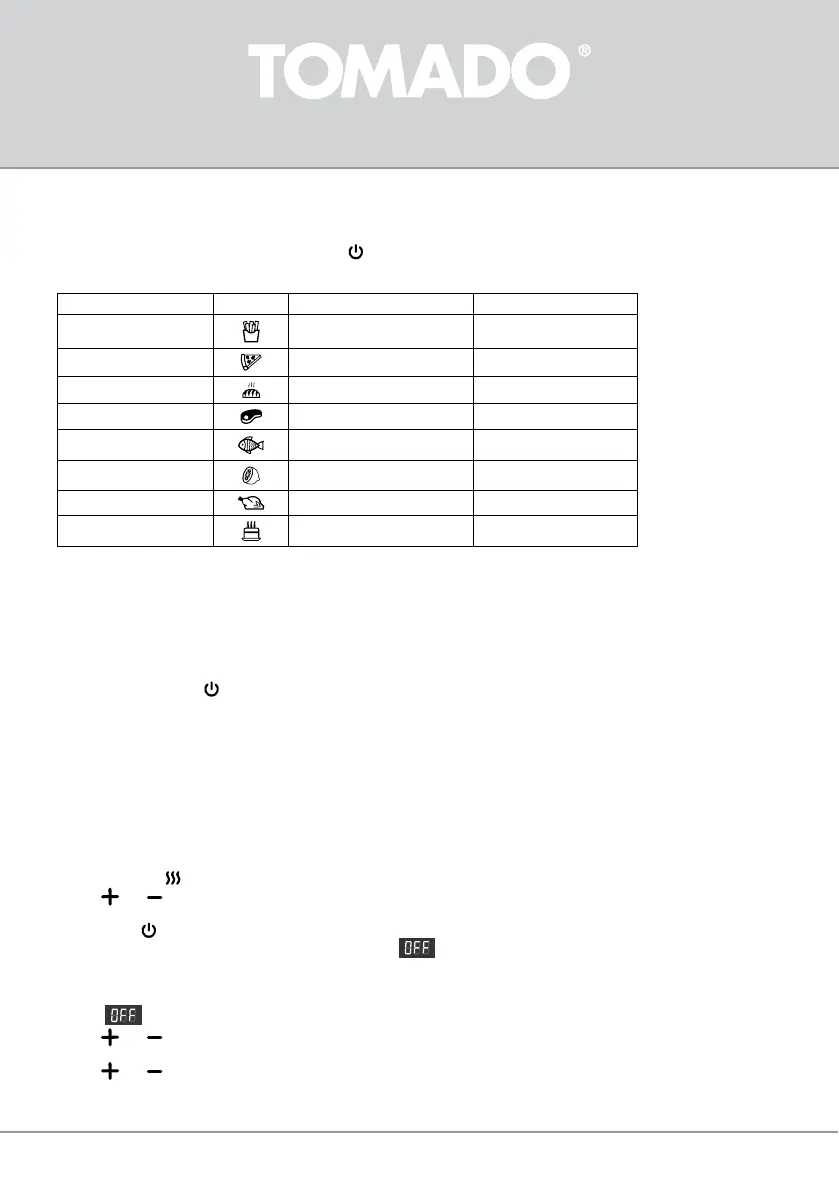
Automac menus
Baking programme Symbol Standard temperature °C Standard me minutes
French fries
200 20
Pizza
150 12
Bread
165 15
Steak
180 15
Fish, seafood
160 12
Drying (dehydrang)
40 120 (2 hours)
Chicken
180 30
Pastry
160 35
The temperatures and times in the table are indications. Depending on size and weight, it may be necessary to adjust
temperature and time. It is possible to adjust the set temperature and time of the automatic menus.
GENERAL OPERATION
General
• Insert the plug in the socket
• Press the On/o buon
Interior lighng
This key is used to switch the interior lighng on or o. The light symbol ashes on the display.
The lighng switches o automacally aer 2 minutes.
Rotang
Use the rotang funcon to heat the food evenly to the rosserie spit.
Preheang
When the appliance is not yet warm, you can use this funcon before placing the food. Without preheang, the food will not
get warm throughout.
• Press preheang
. On the display, “140 °C” and “6 min” are shown in turn.
• Press and on the le side of the control panel to set a higher or lower temperature. The me seng changes
accordingly automacally.
• Press On/o to start the process.
• When the appliance is ready, a sound signal can be heard.
appears on the display.
Frying with hot air - manually
• Preheat the appliance.
• When
appears on the display, you can place the food in the appliance.
• Press
and on the le side of the control panel to set a higher or lower temperature. You can select a temperature
between 80 °C and 200 °C.
• Press
and on the right side of the control panel to set a longer or shorter me. You can select a me between 1 minute
and 90 minutes.



 To Next Page