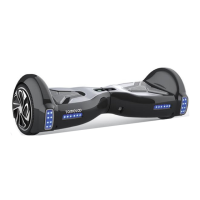
2-4.SPECIFICATIONS
Model:
Net Weight:
Load:
Max Speed:
Max Distance Range:
Max Climbing Angle:
Minimum Turning Radius:
Battery Type:
Battery Voltage:
Battery Capacity:
Power Requirement:
Wheel Size:
Tire Type:
Bluetooth Range:
Bluetooth Speaker:
UL Certification:
Power On: Take your device out of the box and place it flat on a level surface. Press the power
button (located on the rear of your device) once. Check the battery LED indicator (located in the
center of your device). The battery indicator light should be lit, indicating the device is powered
on.
Power Off: Press the power button once.
V2
29.63 lbs (13.44 kg)
44-265 lbs (20-120 kg)
Up to 9.3 mph (15 km/h)
Up to 8.7 miles (14 km)
15°-20°
0°
Lithium-ion
36V
4Ah
AC100-240V,50-60Hz
8.5 Inches (21.59cm)
Non-Pneumatic Solid Tires
Up to 33ft
V4.2with stereo sound quality
UL 2272 approved
*The actual mlleaae and soeed deoends on welaht of users, road conditions and temperature.
- 09 - - 10 -
2-5.CONTROLS AND DISPLAY
· TURNING YOUR DEVICE ON/OFF
There are four sensors under the foot mats on your V2 Scooter. When the user steps off the mats,
it will automatically initiate self-calibration.
When riding the hoverboard, you must ensure you are stepping on the foot mats. Do not step or
stand on any other area of your hoverboard.
Do not put items on the foot mats. Doing so will make the V2 turn on, and increase the probabil-
ity of collision and cause injury to people, riders, or damage the device.
The display board is located in the middle of the V2 Scooter.
· Green LED light stay solid indicates electricity from 100% to 30%.
· Yellow LED light stay solid indicates electricity from 30% to 20%.
· Red LED lightstay solid indicates electricity from under 20%.
When the LED light turns red, please stop riding.
· MAT SENSOR
· BATTERY INDICATOR


 To Next Page