5
The welding helmet ERGOTECH complies with EEC directives 89/686 CEE. This conrmity is established in compliance with EN 175, EN 166, EN 168 and EN 379.
Notied bodies / organisations :
Cell : Welding hood / Protection
screen :
Identication number : 0196 Identication number : 1883
This manual has been made to help you using this helmet, ready to use. For your protection, please read carrefully these instructions and consult with a qualied instructor prior
to operation.
BEFORE WELDING
- Check that the helmet is in good condition
- Headband adjustment.
-Check whether the front cover lens, the front frame and lter are inserted and xed in place. In case of anomalie, please proceed to its reconditionning.
-Make sure that the 4 sensors and the cell are not obstructed by dust or debris.
-Make sure that the protection lms on both screens are removed.
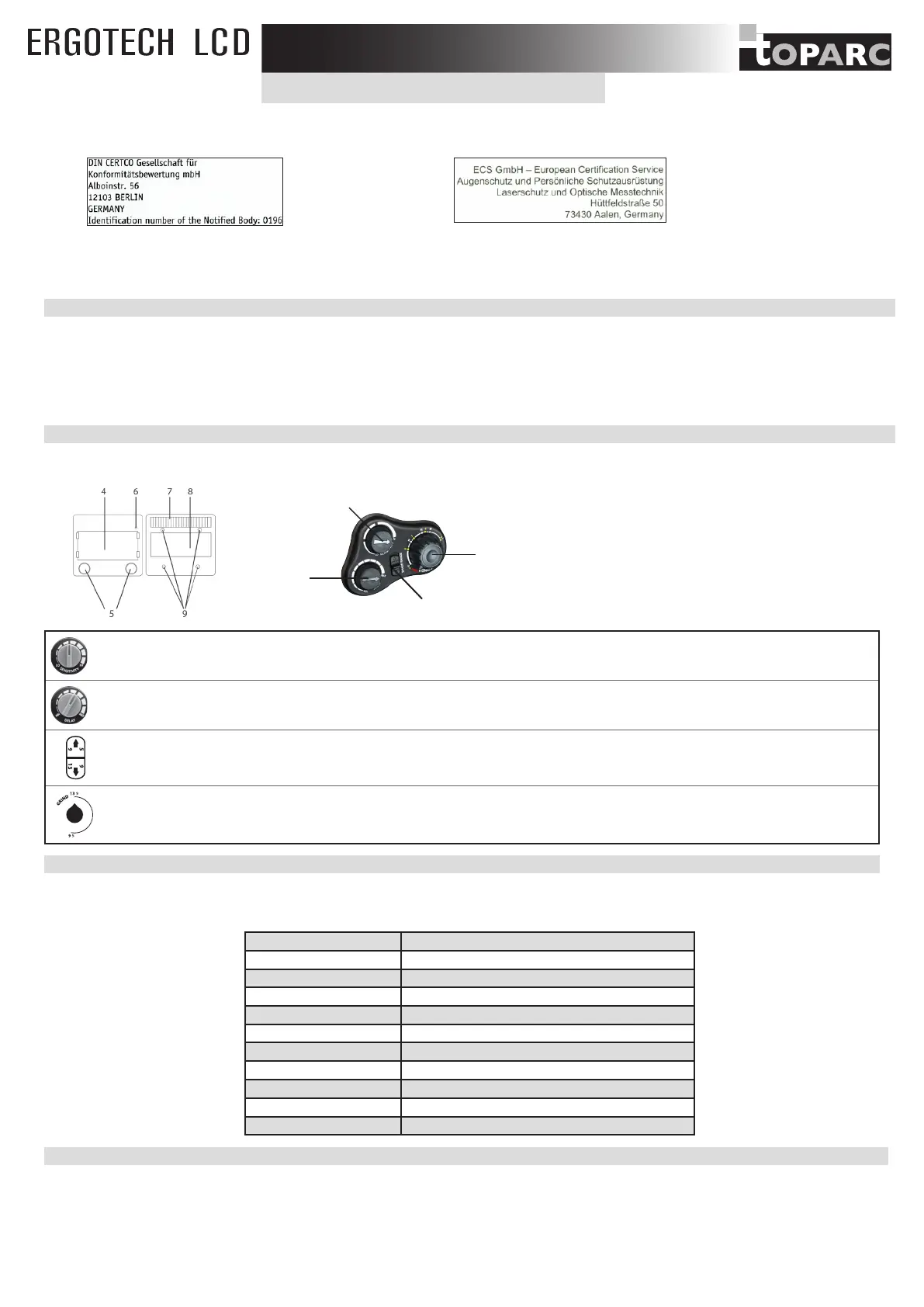
-Make sure that the red light (6) is off, otherwise change the batteries (5).
-Check that the protection level matches your welding processes. Please refer to the following chart to help your choice (cf. welding process board)
OPERATION
The ERGOTECH auto-darkening welding helmet switches light to dark state when a welding arc is struck. The auto-darkening welding helmet switches back to the light state
when the arc stops.
10
3
2
1
1. Shade adjustment 5-9/9-13
2. Delay time control knob
3. Sensitivity control knob
4. LCD protect plate
5. Lithium batteries (CR2450)
6. Low volume charge
7. Solar cell
8. Filter
9. Sensors
10. Potentionmeter «Welding-Grinding»
• External sensitivity potentiometer : Sensitivity adjustment according to :
- Light ambient: Without welding, turn the sensitivity setting towards «max», then turn the sensitivity setting towards «low» until lter lightens.
- Welding process: «Max» position for low amperage TIG rpocess / Medium range for most application.
• External delay potentionmeter: Time to get the clear state back.
Delay is designed for slower switching time to clear state to eliminate remained bright rays.
The external shade range selector allows to choose the shade range between 5-9 or 9-13.
The external potentiometer allows to adjust the shade according to the selected shade range.
- «GRIND» knob: For non-welding operation, you can switch off the lter on»Grind» mode.
WARNING: To be protected before welding, carefully check the switch to be on WELD mode.
PRECAUTIONS
• The welding helmet is suitable for use with virtually all welding processes except Oxy-Acetylene welding, laser welding and gas.
• Standard protective screens must be installed on both inside and outside surfaces of the module. Failure to use protective screens may constitute a safety hazard or result in
irreparable damage to the module.
Clear shade 4
Dark shade 5-9/9-13
Filter dimension 114x133 mm
Reaction speed 0,0002 s
Power supply Solar + batteries
Weight 510 gr
Field of vision 100x67 mm
Applications
MMA 5>400A / TIG 2>300A / MIG-MAG 5>400A / Grind
Warranty 1 year
Application temperature -5°C / + 55°C
Storage temperature -20°C / + 70°C
HEADBAND ADJUSTMENT
The ERGOTECH helmet is equipped with a headband which offers 4 different settings to the welder: width, height (1), longitudinal inclination (2) and adjustment (3).
EN
3


 To Next Page