14
&RQWUROVDQGPHQXVWUXFWXUH 8OWUD5DQJH
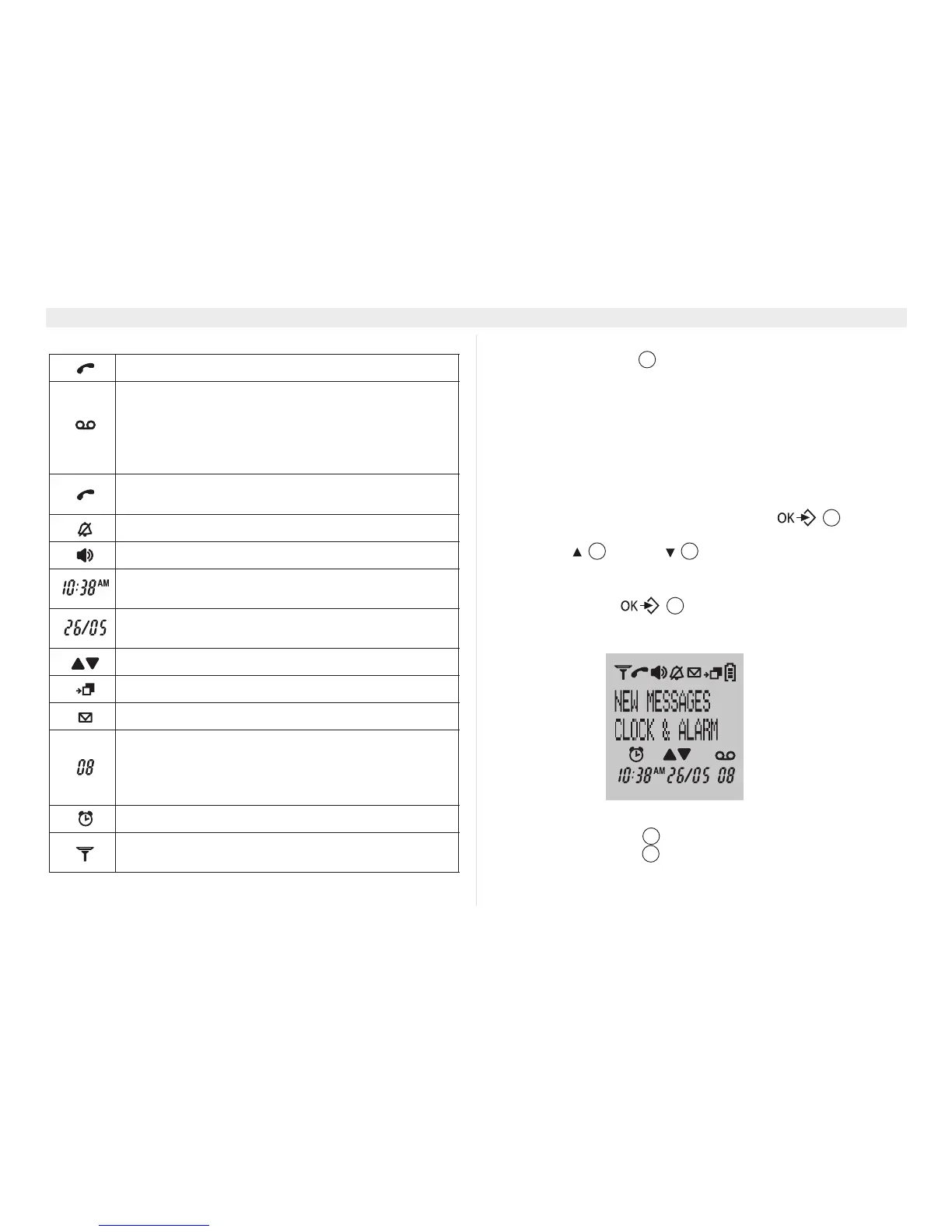
6\PEROV
(*) If caller ID is activated for your telephone line.
(YHQW/('
The front handset LED at the upper left indicates the following:
• Blinking fast: incoming call.
• Blinking slow: intercom call or paging.
• Blinking every 2 seconds: there are new event message in
handset (see second text line on the display).
0HQXVWUXFWXUH
The handset has an easy-to-use menu structure. Every menu
opens a list of options.
To open the main menu, press the menu key when the
handset is on and in standby mode.
Press the up or down key to scroll through to the menu
option you want. The instructions in this user guide show the key
symbols and the position number on the device overview. Then
press the menu key again to open other options or to
confirm the setting that is displayed.
([LWPHQXRUJRXSDPHQXOHYHO
Press escape key (6& to go to the previous menu option.
You can press the (6& key at any time to cancel and return to
standby mode. If you do not press any key for 20 seconds, the
handset automatically reverts to standby mode.
In communication (off-hook).
Tam icon:
- Blinking when there is a new message;
- Fast blinking when answering machine is full;
- On: answering machine is on;
- Off: answering machine is off.
- During communication (steady);
- Flashing during ringing.
Handset ring tone off.
Hands free function enabled.
Time: actual time in standby. Received call time in
call list or during playback messages.
Date: actual date in standby. Received call date in
call list or during playback messages.
Direction to other menu options.
Calls list entries(*).
New mailbox message.
- If there are new messages, this counter will
indicate the number of messages.
- If there are no new messages, this counter will
indicate the number of old messages.
Alarm activated.
Aerial symbol: within range (permanent display) -
out of range (flashing).
18
17















 To Next Page