Chapter 2 Standard Features 19
2. Loosen the screws to the battery compartment, and remove
the door. The hand strap remains attached.
CAUTION: The FC-600 is not sealed against water and dust
when the battery door is not installed properly.
3. Remove the battery pack.
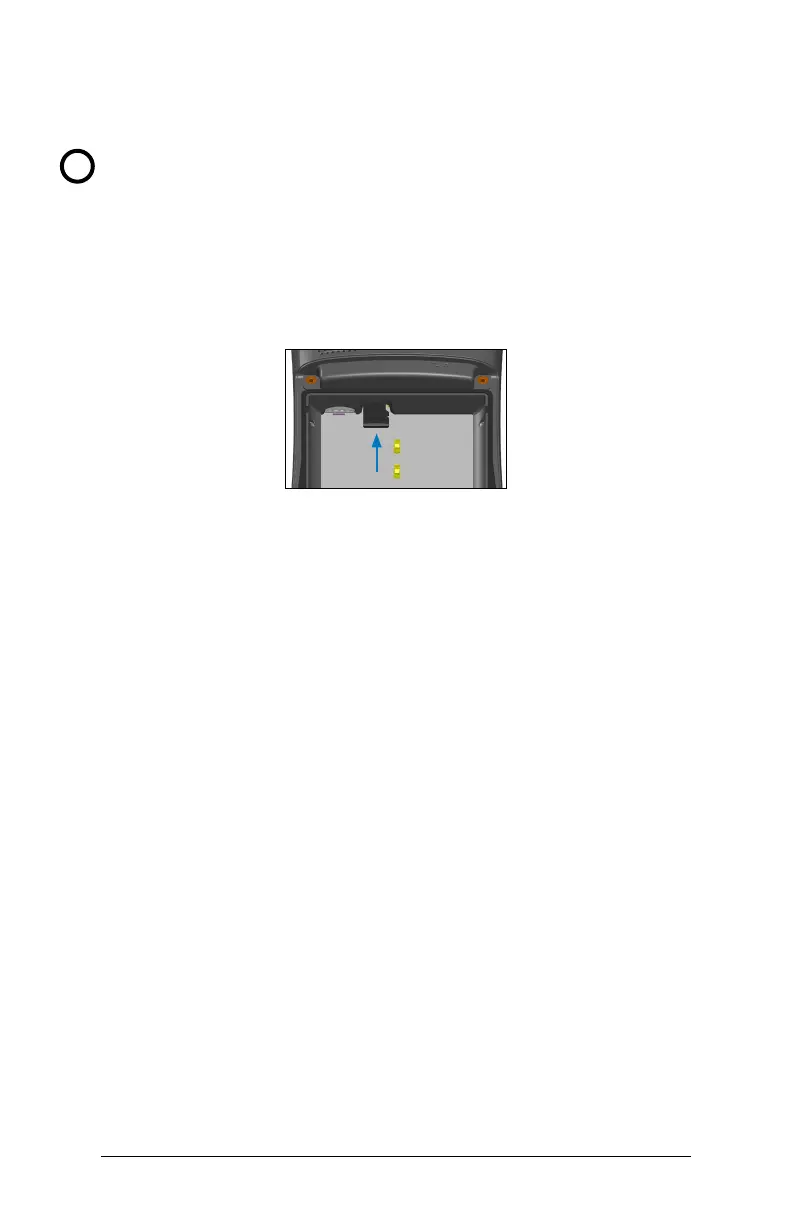
4. An image on the battery compartment label shows the correct
location and orientation for the SD card (slot on the right). Push
the card into the slot to insert it. To remove the SD card, pull it
out.
5. Replace the battery pack, and attach the battery door.
6. Power up the handheld.
Bluetooth
®
Wireless Communication
The FC-600 has built-in Bluetooth
®
wireless technology. It has
a tested range of 100 feet (30 meters), but actual range varies
depending on the output of both paired devices.
Test your FC-600 with the devices you connect it with. You may find
the actual range extends far beyond the tested range.
Pairing a Device
To pair the FC-600 and another device using Bluetooth technology:
1. Turn both devices on.
2. Make Bluetooth discoverable on both devices.
Bluetooth on the FC-600 is o by default. To activate it, go to
Settings > Bluetooth.
3. In the Bluetooth settings screen, a list of all Bluetooth devices
within range is shown. Tap on the name of the device in the list
that you would like to pair with. If prompted, enter the PIN or
pass code of the device you want to pair with.
The FC-600 should now be paired with the device.
!



 To Next Page