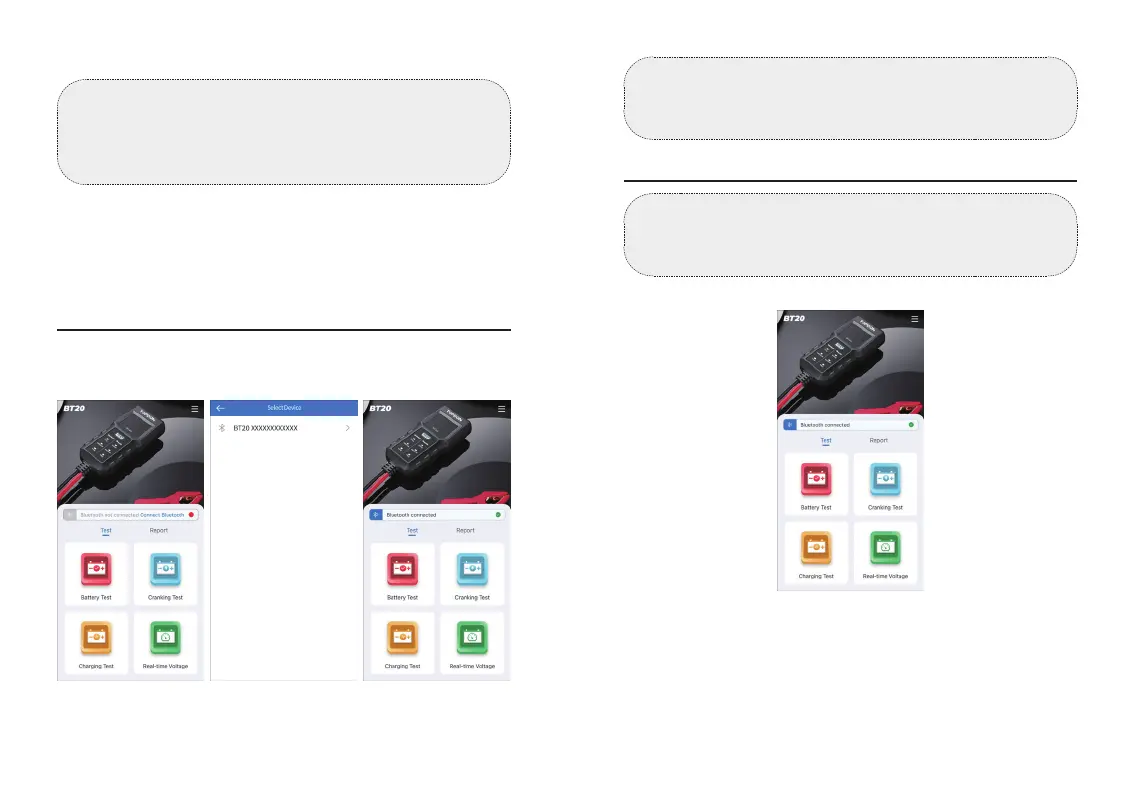
Bluetooth Connection
After connecting the tester to the battery properly and
completing the account setup, tap Connect Bluetooth on the
home page to connect the battery tester to the App.
After a successful connection, the Bluetooth icon on the LCD
display will light up and not ash on and off.
②
Bluetooth Connection
③
Battery Test
④
Cranking Test
⑤
Charging Test
⑥
Real-time Voltage
⑦
Test Results by Timeline
Tip:
If you already have a TOPDON account, please directly
log in with it. If you don't have, tap [Register Now] at the
bottom of the [Login] page, register an account with a valid
email address, and then log in.
log in, just skip it.)
Figure 5.3.1
Notes:
1. Only one tester can be connected to the App at a time.
2. Once the Bluetooth is connected, the Test Button on the
battery tester will become unavailable.
WARNING:
Before the test, the engine and all other accessory loads
must be off to ensure accurate results. The battery testing
function only applies to 12V lead-acid batteries.
Battery Test
1) Select Battery Test.
2) Select a battery parameter (CCA or Ah), enter the value, and
tap Next. The specic battery standard is normally listed on
the battery label.
3) Tap Test.
Figure 5.4.1
EN I 15EN I 14


 To Next Page